
Free rental inventory template

Free rental inventory spreadsheet template

Download an XLSX or CSV template built for equipment and tool rental businesses. Track rental products, physical units, consumables, rates, deposits, SKUs, status, location, cost, and condition in one import-ready worksheet.

XLSX and CSV · no email required · ready for Excel, Google Sheets, and RentalBench imports

RentalBench inventory import template

XLSX or CSV · three valid examples

Product nameProduct typeSKUQtyStatus
14 ft Utility TrailerRentalTRAILER-14-0011Available
Plate CompactorRentalGenerated on import2Available
Safety GlassesConsumableSAFETY-GLASSES-CLEAR50Available

23

mapped headers

1,000

rows per import

2

download formats

What the template tracks

Rental inventory fields that survive the handoff

Generic stock sheets count what you own. A rental inventory spreadsheet also needs to identify what leaves, what comes back, what can be sold, and what staff can promise next.

Products and physical inventory

Name products consistently, separate rentals from consumables, and identify exact units when condition or responsibility matters.

  • Product name, type, description, and category
  • SKU, variant SKU, quantity, barcode, and serial number
  • Variant name, variant value, and condition
Rental rates and deposits

Keep the commercial fields staff need beside the inventory record instead of rebuilding them during order entry.

  • Daily, weekly, monthly, and yearly rental prices
  • Consumable sale price
  • Rental deposit and equipment cost

Status and operating context

Give the team enough context to understand where an item belongs and whether it is ready to rent.

  • Available, reserved, checked out, maintenance, retired, or lost
  • Source location and supplier
  • Import notes and condition details

How to use the template

Start in the spreadsheet and keep a clean path to import

  1. 01

    Choose XLSX or CSV

    Open the XLSX in Excel or Google Sheets, or use the CSV in any spreadsheet or import tool. No account or email is required.

  2. 02

    Replace the example rows

    Keep the first-row headers unchanged, remove or replace the three valid examples, and add one row pattern per product or unit.

  3. 03

    Import when the team is ready

    Upload the same XLSX or CSV to RentalBench, review the automatic field mappings and warnings, then confirm the clean rows.

Import-ready by design

The same columns map directly into RentalBench

The worksheet uses 23 headers recognized by the RentalBench importer. Product name, SKU or quantity, rates, deposits, variants, status, location, identifiers, and notes arrive in a preview before anything becomes live inventory.

Keep existing SKUs or let RentalBench generate rental-unit SKUs from quantity.

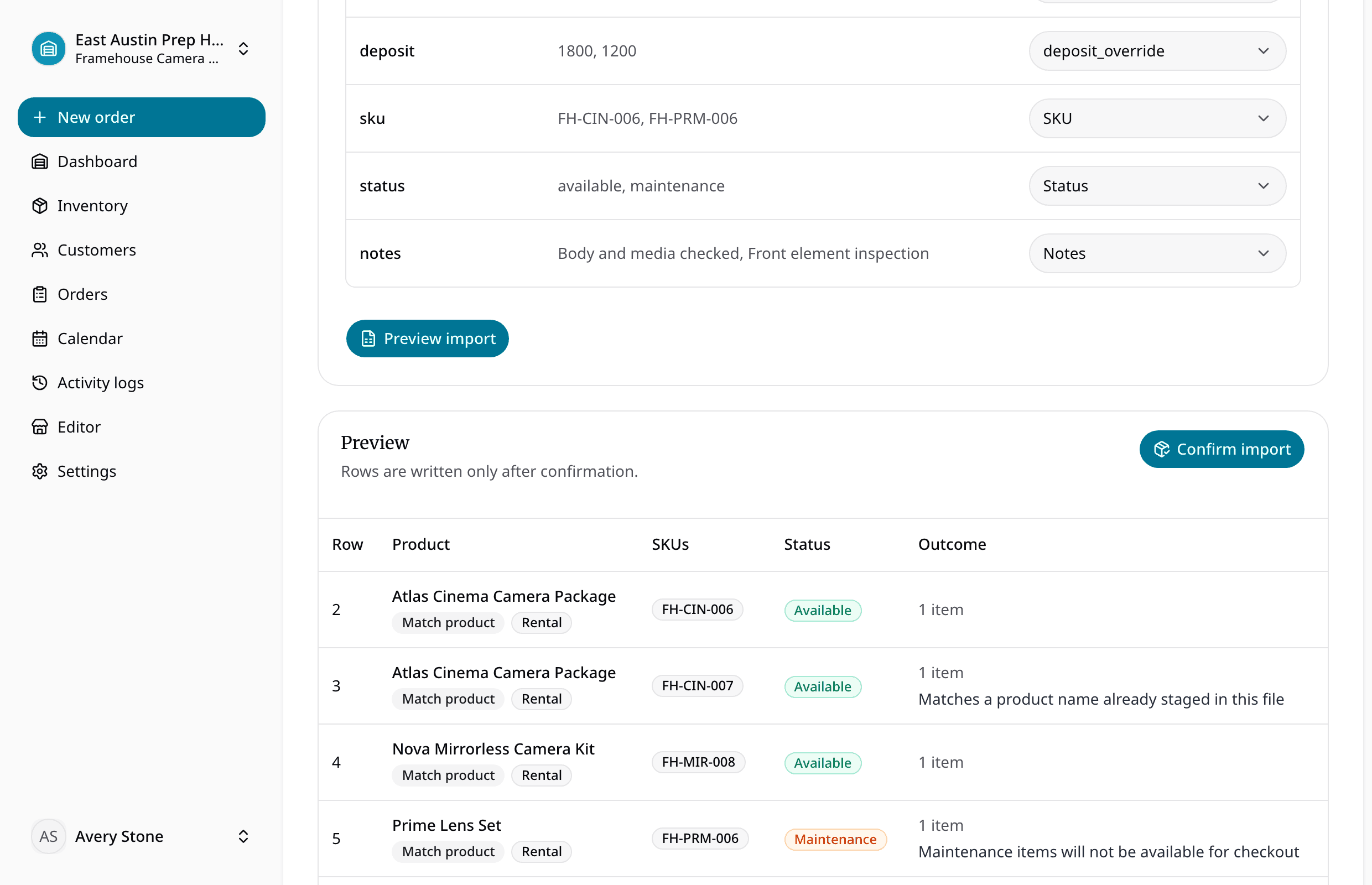
Review suggested mappings, warnings, products, units, and consumable stock before confirming.

Explore inventory imports
Inventory import preview with validation warnings, generated SKUs, and product rows ready to confirm

Questions

Rental inventory spreadsheet FAQ

Is the rental inventory spreadsheet template free?

Yes. The XLSX and CSV are free to download and do not require an email address, account, or RentalBench subscription.

What can I track in the rental inventory spreadsheet?

The template includes product details, rental or consumable type, physical-unit and variant SKUs, quantity, status, notes, rental rates, sale price, deposit, category, location, supplier, cost, barcode, serial number, and condition.

Does the template work for tools, trailers, and equipment?

Yes. The fields work for tool rental, compact and construction equipment, trailers, camera and AV gear, event inventory, outdoor equipment, kits, and consumable stock.

Can I use the spreadsheet with RentalBench?

Yes. Its 23 headers match fields recognized by the RentalBench inventory importer. Upload the XLSX or CSV, review the suggested mapping and preview, resolve any warnings, and then confirm the import.

Why does the download contain only one worksheet?

RentalBench imports one worksheet at a time so the header row and every inventory row have one clear structure. Keeping the file to one sheet also makes mapping and validation easier to review.

Can I convert the template to CSV?

You do not need to convert it: a matching CSV is available beside the XLSX. RentalBench accepts both formats, with up to 1,000 data rows per import.

Spreadsheet migration

Keep the spreadsheet until the rental workflow needs more

When several people need the same answer about availability, assigned units, due-backs, deposits, checkout, returns, and maintenance, import the clean rows into RentalBench.

Inventory, SKUs, and item status

Availability, reservations, and due-back dates

Orders, deposits, checkout, and returns

Prefer email? Reach us at hello@rentalbench.com. We reply directly.