
How to Prevent Rental Overbookings Before They Reach the Counter
Learn how to prevent rental overbookings with availability checks, exact item assignment, due-back buffers, maintenance holds, and staff approval.
April 30, 2026 · 8 min read
Key takeaways
The practical answer
- Availability includes dates, exact stock, location, status, due-backs, and inspection.
- Keep customer requests uncommitted until staff verifies the complete order.
- Returned inventory should reopen only after it is inspected and ready.
Rental overbookings usually start earlier than people think.
They do not start when a customer is standing at the counter and the item is missing. They start when a request is approved without a clean availability check. They start when a spreadsheet says an item is available, but the return was never marked complete. They start when a maintenance note lives in a text message instead of changing the item status.
If you run a small rental business, the goal is not to build a complicated approval process. The goal is simpler:
Make sure your team only promises inventory that can realistically be rented for the requested window.
That means connecting the daily pieces of rental work: inventory, SKUs, customer requests, reservations, due-back dates, checkout, returns, deposits, maintenance, and customer records.
This guide walks through a practical workflow to prevent rental overbookings before they reach pickup time.
Quick Answer: How to Prevent Rental Overbookings
Prevent rental overbookings by making five checks before approval:
- Compare the complete requested window with reservations and active rentals.
- Assign the exact item when condition, location, variant, or serialized unit matters.
- Leave enough due-back buffer for inspection, cleaning, charging, or prep.
- Treat overdue, maintenance, retired, lost, and uninspected items as unavailable.
- Keep online and staff-entered requests uncommitted until a person approves the reservation.
RentalBench brings those checks into one rental overbooking prevention workflow. The rest of this guide explains how to apply them with or without dedicated software.
Start With a Clear Definition of Available
The first step is agreeing on what "available" actually means.
For rentals, available should not mean "we own one."
It should mean:
- The item is not reserved for an overlapping date range.
- The item is not currently checked out.
- The item is not overdue.
- The item is not blocked for maintenance.
- The item is at the right location.
- The item has the required accessories.
- The item can be inspected, cleaned, and prepared before the next pickup.
That last point matters.
A trailer due back at 10 a.m. is not automatically safe to rent again at 10:15 a.m. A camera kit returned with a missing charger is not ready just because the case is back on the shelf. A plate compactor that comes back dirty may need time before it can go out again.
If your team treats the end of a calendar event as automatic availability, overbookings will keep slipping through.
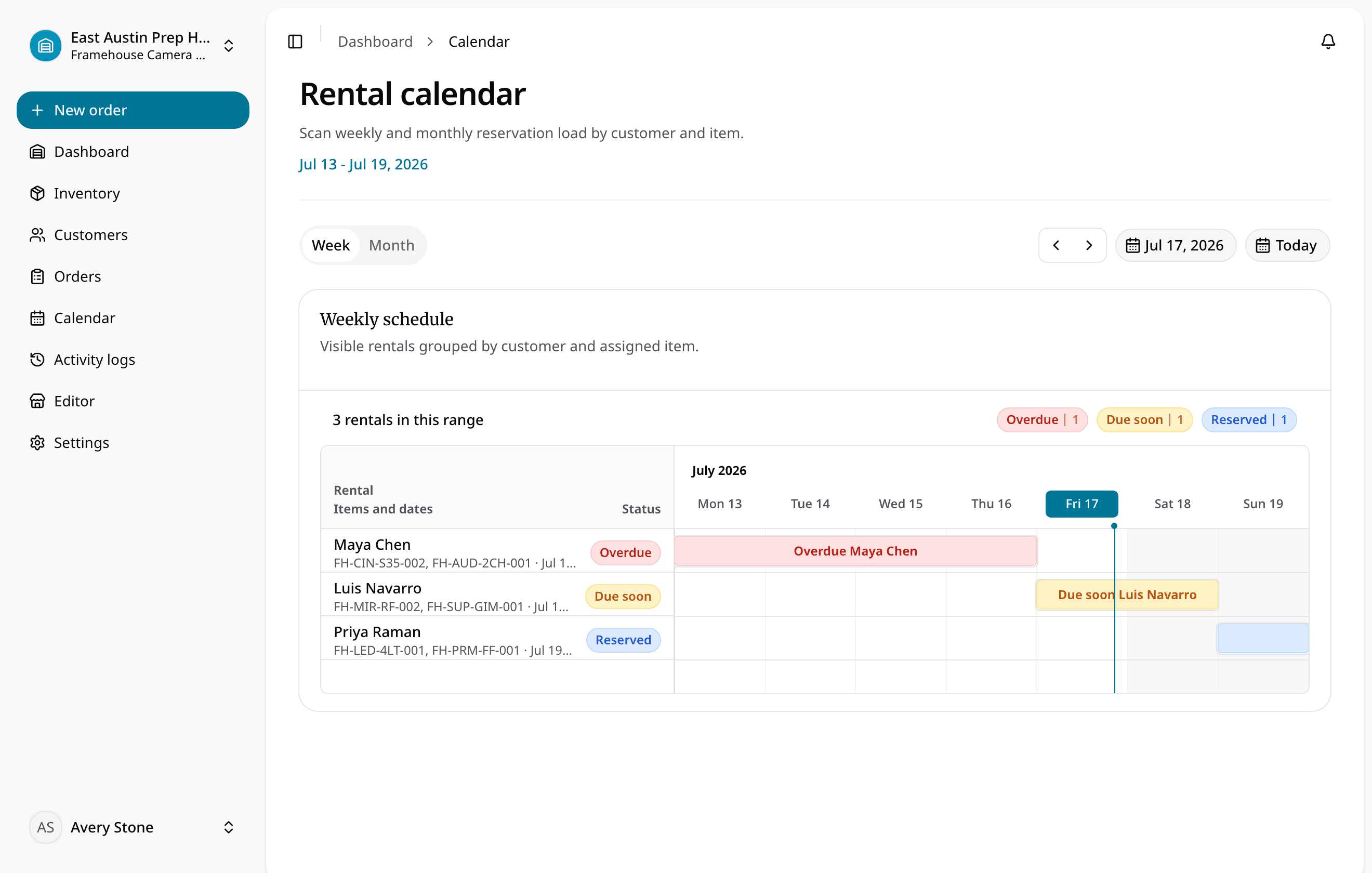
A reliable availability calendar should show what is requested, reserved, out, due back, blocked, and ready. The calendar is only useful if it reflects the real condition of the inventory.
Keep Requests Separate From Reservations
One common source of overbooking is treating every inquiry like a confirmed rental.
A request is interest.
A reservation is a promise.
Those two states need to stay separate.
For example, a customer might submit an online request for a dump trailer from Friday afternoon through Monday morning. That request should give staff the details needed to review the rental, but it should not blindly become a confirmed commitment if the trailer is late, blocked, or already promised.
A cleaner workflow looks like this:
- Customer asks for an item, date range, and pickup or delivery details.
- Staff checks availability against real inventory.
- Staff reviews customer notes, deposit requirements, and operational fit.
- Staff approves, edits, or declines the request.
- Only approved requests become reservations.
This protects the schedule without hiding demand.
It also gives your team room to make practical decisions. Maybe the exact trailer is not available, but another unit works. Maybe the customer can pick up two hours later. Maybe a deposit needs to be collected before the item is held.
RentalBench supports this kind of handoff through orders and reservations, where requests, confirmed reservations, and active rental orders stay connected instead of becoming separate records.
Track the Exact Item When It Matters
Overbookings often happen because staff talk about inventory at one level while the schedule depends on another.
A customer asks for "a generator."
The spreadsheet says there are three.
But one generator is out until Thursday, one is waiting on service, and one is reserved for a weekend job.
On paper, you have three. In the rental operation, you may have zero available for the requested dates.
That is why rental businesses need to distinguish between the catalog item and the physical unit.
The catalog item is what the customer asks for:
- 14-foot utility trailer
- Plate compactor
- Generator
- Concrete saw
- Camera kit
- Tent package
The physical item is the real unit your team hands out:
- Trailer T-014
- Compactor PC-003
- Generator GEN-007
- Camera kit KIT-012
Some inventory can be scheduled by quantity. Other inventory needs exact item assignment. Many rental businesses need both.
If your team rents specific trailers, compact machines, serialized tools, kits, or high-value gear, the reservation should show the exact item or the exact pool of eligible items. That is where purpose-built rental inventory software is stronger than a flat spreadsheet or appointment calendar.
The more specific the item, the less room there is for vague scheduling.
Add Buffers Around Due-Back Dates
Overbookings are not always caused by overlapping reservations. Sometimes they are caused by unrealistic turnaround time.
Here is a normal example.
A customer is due to return a trailer Monday at 9 a.m. Another customer wants the same trailer Monday at 10 a.m. The calendar technically allows it.
But the operation may not.
What if the first customer is late? What if the trailer needs cleaning? What if a light is out? What if staff are already handling three morning pickups? What if the next customer is driving from out of town and cannot wait?
That does not mean every rental needs a large buffer. Some items can turn around quickly. Others need inspection, fuel, charging, cleaning, loading, or accessory checks.
The useful rule is this:
Set buffers based on the work required to make the item ready, not based on empty space in the calendar.
For small teams, that might mean:
- No same-hour turnaround for trailers.
- Half-day buffers for compact equipment.
- Inspection holds after higher-risk rentals.
- Kit checks before anything with many accessories becomes available again.
- Manual approval for back-to-back reservations.
Buffers are not wasted time if they prevent a bad promise.
They also help staff give cleaner answers. Instead of debating each tight booking from memory, the team has a shared rule for when a return can safely support the next rental.

Make Checkout Change the Item Status
Checkout is where a reservation becomes a physical rental.
If checkout is not tracked, the schedule starts drifting from reality.
A calendar may show that an item was reserved. But staff still need to know whether it actually left, which unit went out, who took it, what accessories were included, and when it is due back.
At checkout, the system should capture:
- Customer
- Order or reservation
- Exact item or SKU
- Checkout date and time
- Due-back date and time
- Deposit status
- Accessories included
- Pickup or delivery details
- Staff notes
Most importantly, the item status should change.
It should no longer appear as simply reserved or available. It should be marked as out with a customer.
That matters because other staff members may not have seen the handoff. If the item status stays stale, someone else may promise the same unit based on old information.
The checkout and returns workflow is where overbooking prevention becomes operational. It connects the calendar promise to the physical movement of the item.
Do Not Make Returned Mean Ready
Return is the other place where overbookings enter the system.
An item can be physically returned and still not be rentable.
It may be dirty. It may be damaged. It may be missing an attachment. It may need a battery charged, a blade replaced, a hose found, or a staff inspection before it goes back out.
If your process marks every return as automatically available, the next customer may inherit the problem.
A better return workflow separates the states:
- Returned and ready
- Returned, needs inspection
- Returned, needs cleaning
- Returned, missing accessory
- Returned, damaged
- Returned, in maintenance
Only the first state should release the item back into normal availability.
This is especially important for kits and bundles. A kit can look complete at a glance but still be missing a charger, cable, strap, case insert, or small accessory that the next customer needs.
RentalBench treats item statuses and maintenance as part of availability because a maintenance note that does not affect availability is easy to miss. The status needs to protect the schedule.
Watch for Overbooking Warning Signs
Most rental businesses see warning signs before a serious overbooking.
The signs are easy to ignore because each one feels small by itself.
Watch for these patterns:
- Staff check more than one place before confirming availability.
- The calendar and inventory list disagree.
- Requests sit in an inbox without a clear owner.
- Returned items stay unavailable because nobody updates them.
- Damaged items still appear rentable.
- Deposits are recorded separately from the reservation.
- Customers call about requests that staff cannot find.
- Staff ask one person for the "real" schedule.
- Back-to-back rentals require guesswork.
- A customer arrives before the item is ready.
None of these mean your team is careless.
They usually mean the system is asking people to remember too much.
If the answer to "Can we rent this?" depends on a spreadsheet, a paper calendar, a text thread, and one person's memory, the process is too fragile for a busy counter.
That is why many operators eventually move from generic calendars to equipment rental scheduling software. The scheduling view needs to know inventory status, not just dates.
Use a Five-Gate Overbooking Prevention Checklist
You do not need a long policy document to improve this.
Start with a short checklist your team can use before approving any rental.
Before confirming a reservation, work through these five gates:
| Gate | What staff checks | Safe result |
|---|---|---|
| Rental window | Requested start and return against reservations and active rentals | No overlap for the complete window |
| Inventory | Product quantity, variant, location, and exact unit where required | Eligible stock is identified and assignable |
| Due-back readiness | Overdue risk, return timing, inspection, cleaning, charging, and prep | The next handoff has a realistic buffer |
| Item status | Maintenance, lost, retired, damaged, or uninspected records | Blocked units stay out of available stock |
| Approval | Customer, deposit, fulfillment, address, and request details | Staff converts a reviewed request into a reservation |
Then confirm the operational details:
- Is the requested item or SKU available for the full rental window?
- Is the exact unit assigned when exact assignment matters?
- Is the item currently out, overdue, or due back too close to pickup?
- Is there enough buffer for inspection, cleaning, charging, or prep?
- Are required accessories available?
- Is the item blocked for maintenance or condition review?
- Has the customer record been checked?
- Is the deposit or payment requirement clear?
- Are pickup, delivery, and return details recorded?
- Has the request been converted into a confirmed reservation?
This checklist works best when the answers live in one system.
If staff have to check five places, the checklist becomes another manual burden. If the inventory, requests, reservations, checkout, returns, and statuses are connected, the checklist becomes a quick review before the team makes a promise.
The Practical Goal
You cannot prevent every rental problem.
Customers return late. Equipment breaks. Weather changes work plans. Staff still need judgment when a tight request comes in from a good customer.
The practical goal is to prevent avoidable overbookings.
That means the system should make conflicts visible before approval, keep requests separate from reservations, assign real inventory, respect due-back risk, update status at checkout, and hold returned items out of availability until they are actually ready.
For small rental teams, this is the difference between a calendar that looks organized and an operation that can be trusted under pressure.
If your current process depends on spreadsheets, paper calendars, and side notes, start by tightening the workflow around availability. The broader equipment rental software category exists for exactly this reason: rental teams need one shared place to manage inventory, reservations, checkout, returns, customer records, deposits, and maintenance status.
Prevent rental overbookings by making the promise later in the process, after the real operational checks have happened.
About Ciprian Redinciuc
Ciprian Redinciuc writes RentalBench product and rental operations guides based on the workflows implemented in RentalBench: inventory, availability, orders, storefront intake, deposits, checkout, and returns.