
Rental Requests, Reservations, and Orders: Why They Should Not Be One Status
Learn why rental requests, reservations, and orders need separate stages so small rental teams can protect inventory, dates, deposits, and returns.
March 31, 2026 · 8 min read
Key takeaways
The practical answer
- A request is demand, approval is a decision, and reservation is an inventory commitment.
- Checkout, return, inspection, rejection, and cancellation need distinct operational states.
- Keep every state change attached to the same customer, dates, items, documents, and payment record.
Rental requests reservations orders can look like one workflow from the outside.
A customer asks for a trailer. Your team says yes. The trailer goes out. The trailer comes back.
But inside a rental operation, those stages are not the same. A request is not a promise. A reservation is not the same as checkout. An order is not just a calendar block.
When a small rental team treats all of these as one status, the system starts to drift. Staff cannot tell whether a customer is waiting for approval, whether inventory is actually held, whether the deposit was handled, or whether an item is already out.
That drift is where double bookings, missed pickups, awkward customer calls, and bad availability data usually start.
The fix is not complicated. Keep requests, reservations, and orders connected, but do not flatten them into one generic "booking" status.
Start With the Simple Difference
Use plain definitions your team can remember.
| Stage | What it means | What the team should know |
|---|---|---|
| Request | A customer has asked for something | What they want, when they want it, and what still needs review |
| Reservation | The business has promised inventory for a date range | Which item or quantity is being held, for which customer, and for which dates |
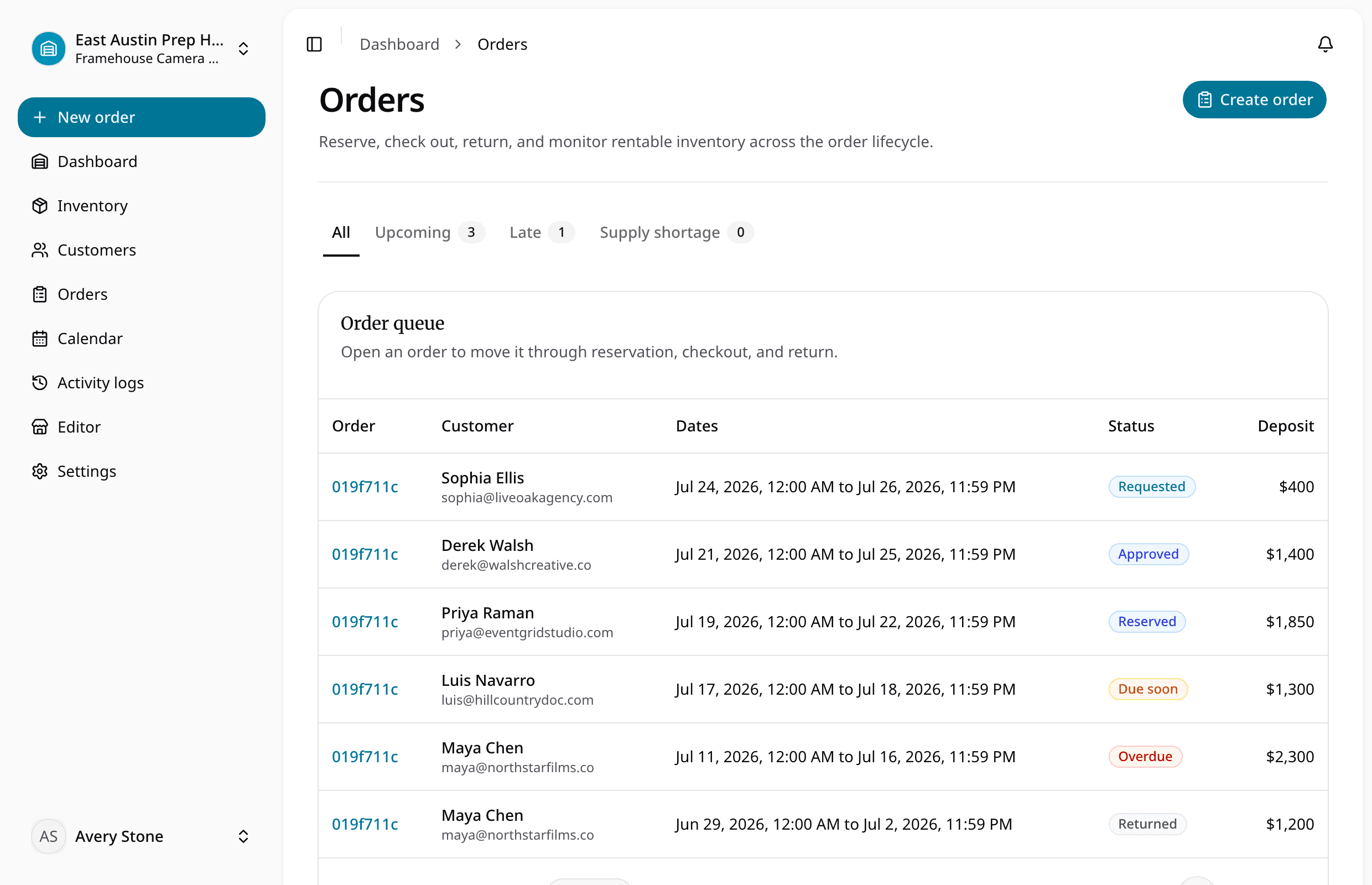
| Order | The working rental record | Customer details, items, dates, deposit, pickup or delivery, checkout, return, and current status |
That distinction matters because each stage answers a different question.
A request answers, "Should we take this rental?"
A reservation answers, "What have we promised?"
An order answers, "What needs to happen now?"
Those questions are related, but they are not interchangeable.
Avoid One Status for Every Stage
Many rental businesses start with a spreadsheet, a shared calendar, or a basic booking tool. At first, one status feels efficient. Everything is a booking. Everything is on the calendar. Everyone can see it.
Then the business gets busier.
A homeowner submits a weekend trailer request, but nobody has checked whether the correct trailer is back from the previous rental. A contractor asks for a concrete saw, but staff still need to confirm the blade type. A customer reserves a generator, but the deposit is pending. A kit is scheduled for pickup, but one accessory is still missing from the last return.
If all of those are simply "booked," your team loses useful context.
Some booked items are only inquiries. Some are firm promises. Some are ready for pickup. Some need payment attention. Some are out. Some are back but not ready to rent again.
The calendar may look full, but the operation is still unclear.
A better availability calendar should show the difference between requested, reserved, out, due back, returned, and unavailable. Availability is not just a date range. It is a date range plus item status.
Keep Requests Visible, Not Confirmed
Rental requests are early-stage work.
They can come from a website, phone call, email, text message, walk-in customer, or repeat account. The request may be serious, but the business has not promised inventory yet.
A useful request record should capture:
- Customer name and contact details
- Requested items or SKUs
- Requested start date and due-back date
- Quantity or specific item preference
- Pickup, delivery, or jobsite notes
- Address details when relevant
- Deposit or eligibility notes
- Internal review status
The point is to stop requests from living only in someone's inbox or memory.
For many small rental teams, request-first intake is safer than instant confirmation. A customer can browse the catalog and submit what they need, while staff still confirm availability, condition, customer fit, delivery timing, and deposit requirements.
That is why an online rental storefront should feed the same operational workflow the staff uses. If the storefront only sends an email that someone later retypes into a sheet, it has not solved the core problem.
The rule is simple: a request should be easy to find, easy to review, and easy to convert. It should not silently block inventory unless your team has intentionally decided that pending requests hold stock.
Use Reservations to Protect Promises
A reservation is different. It means the business has decided to hold inventory for the customer.
That does not always mean the exact physical unit is assigned immediately. In some rental categories, you may reserve a quantity first and assign the specific item closer to pickup. In others, such as trailers, compact equipment, serialized tools, or kits, assigning the exact unit earlier may be important.
Either way, a reservation should protect the promise.
It should show:
- The customer attached to the promise
- The approved rental dates
- The reserved item, SKU, quantity, or physical unit
- Pickup or delivery expectations
- Location context
- Staff notes
- Deposit requirement or status
- Any condition that must be checked before checkout
This is where generic booking tools often fall short. They may block time, but they may not understand which physical item is being held, whether that item is out at another location, or whether it came back damaged yesterday.
For rental operators, a reservation should affect availability. If the reservation does not change what the next staff member sees, it is just a note.
If your team is still managing this in a spreadsheet, compare that workflow against purpose-built rental inventory software. The important test is whether staff can trust what is available for a date range without checking three other places.

Use Orders to Run the Day
An order is the working record.
It is what the counter team, yard team, delivery driver, or owner uses to move the rental from promise to real activity.
That means the order should carry more detail than a reservation. It should answer practical questions:
- Who is the customer?
- What is going out?
- Which SKUs, quantities, or physical units are assigned?
- What are the start and due-back dates?
- Is the deposit collected, pending, waived, or held?
- Is pickup or delivery required?
- What accessories are included?
- Has the item been checked out?
- Has it been returned?
- Did anything come back damaged, late, dirty, or incomplete?
This is the reason orders and reservations should live in the same workflow. Staff should not have to approve a request in one place, create a calendar event in another, copy customer details into a third system, and then write checkout notes on paper.
Every re-entry step creates a chance for the rental record to drift.
A good order view should make the current state obvious. New staff should be able to open the order and understand what needs to happen without asking the one person who took the original call.
Treat Checkout and Return as Core Status Changes
Many teams focus heavily on the front of the workflow: request, quote, reservation, pickup.
But availability is only accurate if checkout and return are handled consistently.
Checkout is the moment inventory leaves your control. Staff should confirm the customer, order, item, due-back date, deposit status, accessories, condition, and any pickup notes.
Return is where availability becomes real again. The item may be back, but that does not mean it is ready.
It may need cleaning. It may be missing a cord. It may have a damaged hitch. It may need inspection before another customer can take it.
That is why checkout and returns should connect directly to order status and item status. If returns automatically make every item available, the system will eventually promise something that should have been held back.
Use return statuses that match the way the business actually works:
- Returned and ready
- Returned late
- Returned with missing parts
- Returned damaged
- Needs cleaning
- Needs inspection
- Under maintenance
The exact words matter less than the discipline. Staff should know what status to use and what that status does to future availability.
A practical workflow for small teams
You do not need an enterprise process to separate these stages.
You need a clear path that staff can follow on a busy day.
For many rental teams, a practical flow looks like this:
- A customer submits or calls in a request.
- Staff review the requested dates, items, customer details, and location.
- Staff approve, adjust, or decline the request.
- Approved work becomes a reservation that affects availability.
- The reservation becomes an order for pickup, delivery, checkout, and return.
- Staff check out the assigned items.
- Staff record the actual return and update item status.
- Items become available again only when they are ready.
That flow keeps judgment in the hands of the team while still giving everyone a shared source of truth.
It also makes handoffs easier. The person who approved the request does not have to be the same person who prepares the order. The person who checks out the item does not have to guess what was promised. The person handling the return can see what went out and what should come back.
Keep Item Status Close to the Order
Requests, reservations, and orders describe customer activity. Item status describes the inventory itself.
You need both.
For example, a plate compactor might be:
- Available
- Requested
- Reserved
- Checked out
- Due back today
- Returned, needs inspection
- Under maintenance
- Retired
Those statuses should not be decorative labels. They should change what the team can promise.
If a generator is under maintenance, it should not appear available just because it is sitting on the shelf. If a trailer is due back Friday at 5 p.m., staff should think carefully before promising it for Friday at 5:30 p.m. if inspection or cleaning is required.
RentalBench treats item statuses and maintenance as part of the rental workflow because status affects real customer promises.
Examples by rental type
A trailer rental request may need staff review before confirmation. The team may need to verify dates, hitch requirements, deposit expectations, pickup location, and whether the exact trailer is ready. Once approved, the reservation protects that trailer or trailer category. The order carries the customer, deposit, assigned trailer, checkout notes, due-back date, and return condition.
A tool rental request may be simpler, but the same structure helps. A customer asks for a concrete saw. Staff check blade type, availability, and due-back timing. The reservation holds the saw. The order tracks the saw, blade, water hose, deposit note, checkout, return, and inspection.
A kit rental request needs even more discipline. The customer may request one camera kit, but the order needs to track cases, batteries, chargers, stands, cables, and any substitutions. Return status matters because one missing accessory can make the whole kit unready.
The inventory is different. The workflow logic is the same.
What to avoid
Avoid calling every stage "booked."
Avoid letting online requests become confirmed promises without staff review when your business needs judgment.
Avoid using reservations that do not affect availability.
Avoid creating orders only at checkout if staff need preparation time.
Avoid return workflows that automatically make items available before inspection.
Avoid status names that only the owner understands.
These are small process choices, but they shape how reliable the rental operation feels to staff and customers.
The main takeaway
Requests, reservations, and orders should be connected, but they should not be one status.
A request captures customer interest. A reservation protects a promise. An order runs the work.
When those stages are clear, staff can review requests without overcommitting inventory. They can hold the right items for the right dates. They can prepare orders with customer, deposit, pickup, and due-back details in one place. They can check items out, receive them back, and keep damaged or unready inventory out of future availability.
That is the practical reason to separate the workflow.
Not for reporting theater. Not for software complexity. For fewer missed promises and a cleaner rental day.
About Ciprian Redinciuc
Ciprian Redinciuc writes RentalBench product and rental operations guides based on the workflows implemented in RentalBench: inventory, availability, orders, storefront intake, deposits, checkout, and returns.