
How to Track Customer History in a Rental Business
Learn how to track customer history in a rental business with linked orders, addresses, notes, and documents. Test the workflow with RentalBench.
October 17, 2026 · 9 min read
Key takeaways
The practical answer
- Keep reusable customer details in one profile and rental-specific facts on the linked order.
- Review previous rentals, documents, return outcomes, and the correct address before confirming repeat work.
- Test your process with a returning customer whose delivery address has changed.
To track customer history in a rental business, keep one customer profile linked to every rental order. Save current contact details, reusable addresses, and staff notes on the profile. Keep rental dates, assigned equipment, documents, payments, and return outcomes on the order they describe. Review both before confirming the next booking.
For small equipment, camera, tool, and event rental teams, the test is practical: can another staff member answer a returning customer's question without searching old messages? Use the steps below to build and test that workflow.
In this guide
- What belongs in rental customer history
- How to track customer history in a rental business: five steps
- A copyable customer-record template
- Example: a returning customer changes delivery address
- Spreadsheet, CRM, or rental software?
- Keep customer records useful and proportionate
- Test the workflow in RentalBench
- Rental customer history FAQ
What belongs in rental customer history
Rental customer history connects a customer to previous and active rentals: what they requested, what left, when it was due, what returned, and which documents or payment records belong to that transaction. A contact list alone cannot explain the rental.
Separate information that changes over time from facts that describe a completed transaction:
| Keep on the customer profile | Keep on each rental order |
|---|---|
| Current name, company, phone, and email | Customer and order reference |
| Reusable billing and delivery addresses | Address used for that specific rental |
| Relevant internal notes and tags | Agreed dates, items, quantities, and rates |
| Customer custom fields your team needs | Documents, payment and deposit records |
| Access to linked orders and documents | Checkout, return, inspection, and exceptions |
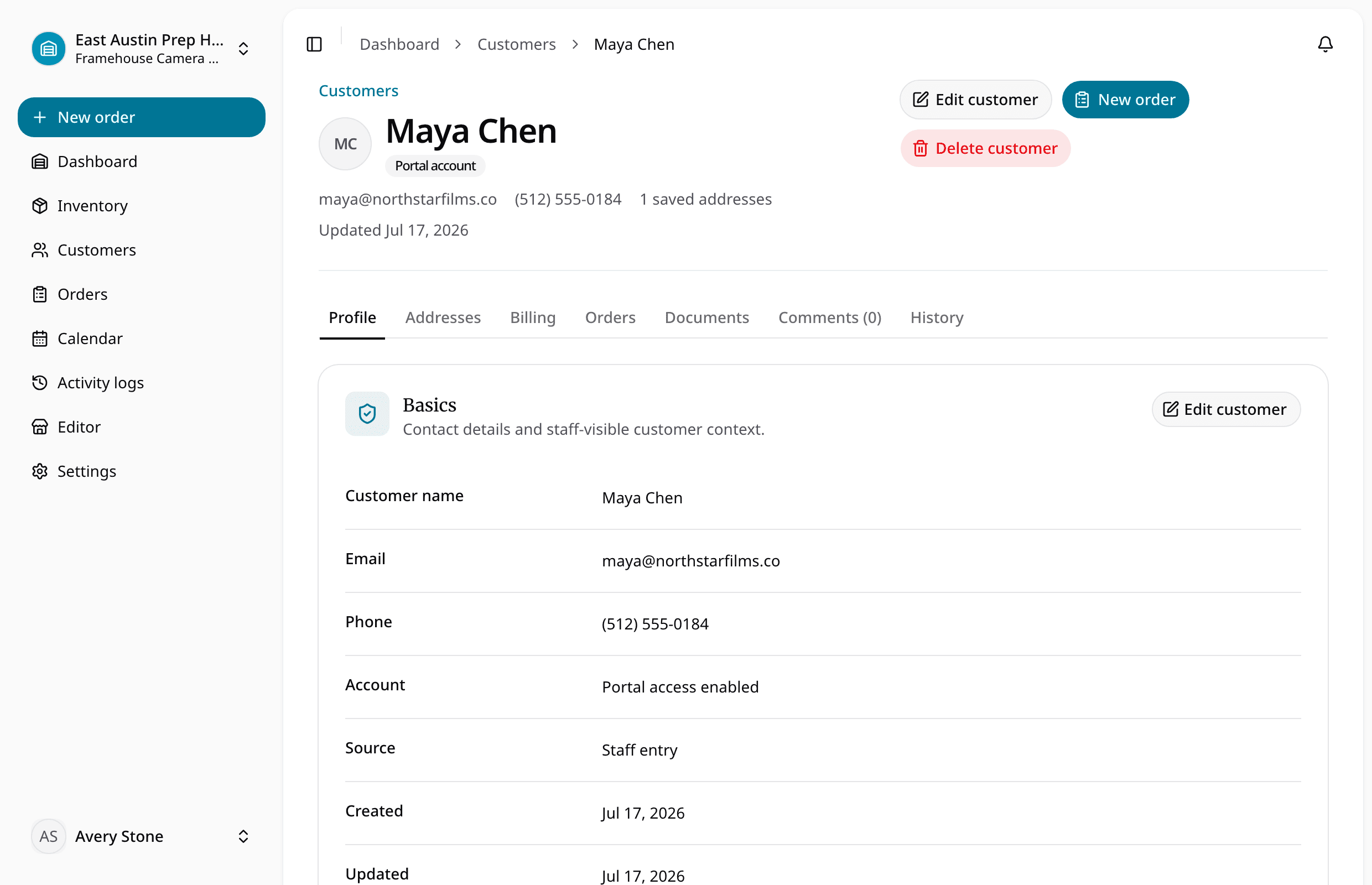
This distinction matters when a customer moves, changes contacts, or rents for a different jobsite. With RentalBench customer management, staff can maintain the customer profile and open linked orders to inspect their details.
How to track customer history in a rental business: five steps
1. Find the existing customer before creating another
Search existing records, then confirm the match with the customer. Similar names do not prove identity. A company may also have several contacts or jobsites.
Use the established record when it is the right match. If duplicates exist, investigate them before changing anything, and preserve access to the orders behind both records. RentalBench requires customer email addresses to be unique within the organization; that check does not replace confirming identity at the counter.
2. Maintain reusable details on the profile
Keep contact information, relevant notes, and saved addresses current. Label billing and delivery purposes so staff can choose deliberately. A repeat customer may pay through the same office while equipment goes to a different site.
In RentalBench, customer profiles support internal notes, tags, custom fields, and saved addresses. Orders retain address snapshots, so correcting the current profile does not change an earlier order's address. The customer addresses and history documentation explains that separation and how to open orders and documents from the profile.
3. Link each rental to its orders and documents
Link every order to the correct customer. Keep agreed dates, equipment, charges, and documents on that order so staff can follow the record when asked about a previous rental.
Distinguish the product from the physical unit when that affects responsibility. Two identical camera bodies can have different return conditions. The rental equipment tracking guide shows how stable item identifiers connect equipment to the rental that used it.
4. Record what happened at each handoff
Capture checkout and return facts while staff can still verify them: the items handed over, accessories, condition, due-back timing, and exceptions. Put an unresolved issue on the relevant order with a clear next action. “Customer called about missing charger on order 1042” is more useful than “check this customer.”
Keep observations factual and distinguish a reported problem from an inspected finding. Returned equipment may still need inspection or maintenance before it can go out again. Use the checkout and return process to keep custody and readiness decisions connected to the rental.
5. Review history before confirming repeat work
Open the customer and relevant prior order before building the next rental. Check the requested equipment and accessories, current billing and delivery details, active commitments, and unresolved order issues. Ask about anything that could have changed.
Confirm current availability, rates, and terms during order entry. A previous rental does not approve the next booking.
A copyable customer-record template
Start with this structure in a shared sheet or use it to evaluate your software. Keep customer and order records separate, linked by a stable reference. The examples below are fictional; replace them with fields your team actually uses.
| Record | Field | Example |
|---|---|---|
| Customer | Customer reference | C-017 |
| Customer | Name and company | Alex Morgan, Morgan Events |
| Customer | Current contact | Confirmed phone and business email |
| Customer | Saved addresses | Office billing; Warehouse B delivery |
| Customer | Relevant note | Confirm site access with Alex before delivery |
| Order | Customer reference | C-017 |
| Order | Order reference | R-1042 |
| Order | Rental window | October 20, 9 a.m.–October 22, 4 p.m. |
| Order | Items | 2 speakers; units SPK-003 and SPK-004 |
| Order | Address snapshot | Warehouse B, as agreed for R-1042 |
| Order | Documents and payment | Linked agreement; payment and deposit status |
| Order | Return outcome | Both speakers inspected; cable query resolved |
Give open actions an owner and review date. Link to orders instead of retyping their history. A customer reference organizes records; it does not prove identity.
Example: a returning customer changes delivery address
Fictional workflow example: Morgan Events rented two speakers last month for Warehouse A. Alex now requests the same equipment for Warehouse B. The name and equipment are familiar, but the delivery details have changed.
Staff finds the existing customer and reviews the prior order. They confirm the new rental dates, availability, accessories, and rate, then add or select Warehouse B for this order. The earlier rental keeps its Warehouse A address snapshot.
Before confirming, staff also checks whether last month's cable query was resolved. The new order records today's agreement; the old order explains the earlier issue. The next shift can open both records.
Spreadsheet, CRM, or rental software?
A spreadsheet can be a reasonable starting point when one person maintains a small customer list and can reliably link it to orders. A general CRM can help manage sales contacts and interactions. Salesforce's explanation of customer relationship management describes that broader customer lifecycle across sales, marketing, commerce, and service.
Rental customer history also needs the operational transaction behind the contact. Choose around the work your team must recover:
| Approach | Useful when | Check before relying on it |
|---|---|---|
| Shared spreadsheet | One owner can maintain linked customer and order sheets | Can staff find the right order without duplicating details? |
| General CRM | Lead follow-up and sales interactions drive the workflow | How will rental items, returns, and documents stay connected? |
| Connected rental software | Several staff handle bookings and physical handoffs | Can a profile lead staff to the relevant order and its outcome? |
Customer tracking for a rental business should make the next decision easier. If staff must reconcile a contact sheet, calendar, agreement folder, and return note before answering, test a connected workflow with a representative rental.
Keep customer records useful and proportionate
Collect information because the operation needs it, and keep notes relevant to the rental. The Federal Trade Commission's Protecting Personal Information guide recommends keeping only necessary information and retaining it only as long as needed. Its Start with Security guidance also recommends limiting access to sensitive information.
Use this short review:
- Can staff explain why each customer field is needed?
- Are notes factual, dated, and tied to the relevant order?
- Are card details and unnecessary identity documents excluded from free-text notes?
- Can only the people who need sensitive records access them?
- Is there a documented retention and disposal process appropriate to the business?
Do not assume archiving a profile deletes its history. RentalBench preserves previous orders, documents, and activity when a customer is archived. Account status and retention decisions serve different purposes.
Test the workflow in RentalBench
Use sample data to test how to track customer history in a rental business before moving your working records. Create one customer with billing and delivery details, add an internal note, and connect two sample rentals. Open the profile, follow an order into its details, and check the available documents.
For the second rental, change the delivery address and confirm the first order still shows its original snapshot. Ask another staff member to identify the right contact, rental, equipment, and outstanding action. Use their answers to evaluate the workflow.
Review RentalBench pricing and trial terms before starting. The 14-day Plus trial requires a card. Start monthly billing begins afterward unless you choose another plan or cancel through billing; use the trial to check the workflow against your own rentals.
Rental customer history FAQ
What customer information should a rental business track?
Track current contact details, relevant saved addresses, and necessary internal notes on the customer profile. Link each rental's dates, equipment, documents, payments, deposits, and return outcome through its order. Keep the information needed to serve the customer and explain the transaction, with clear ownership of unresolved issues.
Can I track rental customer history in a spreadsheet?
Yes, if your team can maintain linked customer and order records consistently. Use a stable customer reference on each order and preserve the address and terms agreed for that rental. Reconsider the setup when multiple staff, frequent changes, or scattered documents make the records difficult to reconcile.
Is rental customer management the same as a CRM?
They overlap, but the workflow you need may differ. A CRM commonly organizes customer interactions and sales activity. Rental customer management needs those customer details connected to bookings, equipment, documents, checkout, and returns. Evaluate whether the system can recover the operational history you need before confirming another rental.
Should changing a customer address change past rentals?
Past rental orders should retain the address agreed for that transaction. Update the reusable customer profile for future work, then choose the appropriate address for the new order. RentalBench preserves order address snapshots, so editing today's customer address does not rewrite the address recorded on an earlier order.
About Ciprian Redinciuc
Ciprian Redinciuc writes RentalBench product and rental operations guides based on the workflows implemented in RentalBench: inventory, availability, orders, storefront intake, deposits, checkout, and returns.