
How to Keep Track of Rental Equipment in 5 Steps
Learn how to keep track of rental equipment with a five-step workflow for item IDs, availability, checkout, returns, maintenance, locations, and audits.
July 11, 2026 · 8 min read

Key takeaways
The practical answer
- Give every physical unit a stable identifier, even when customers reserve a product or quantity.
- Keep status, location, custody, due-back timing, and the next commitment in one shared record.
- Make every reservation, checkout, return, and maintenance handoff update that record before the work is complete.
To keep track of rental equipment, give every physical unit a stable ID and maintain one shared record for its status, location, customer or order, due-back date, condition, and next reservation. Update that record at every reservation, checkout, return, transfer, and maintenance handoff. Review exceptions daily and reconcile the records with the physical inventory on a schedule that fits the value and rental frequency of the equipment.
For a small commercial rental team, the goal is to answer ordinary operating questions without checking a spreadsheet, a calendar, a message thread, and someone else's memory. The sections below cover the five-step workflow, essential fields, daily exceptions, and the point where a spreadsheet stops being reliable.
How to Keep Track of Rental Equipment Reliably
Tracking rental equipment means knowing the identity, status, location, custody, condition, and time commitments of every rentable unit. A useful record should answer what the item is, where it is, who has it, when it is due back, whether it is ready, and what reservation or maintenance hold affects it next.
This is narrower than a complete asset-management program, but it follows the lifecycle principle in the International Organization for Standardization's ISO 55000 overview. Rental operations add time commitments: equipment leaves, comes back, changes condition, and may already be promised again. The system must show what the team can safely rent for a requested date range.
Step 1: Give Every Physical Unit a Stable Identifier
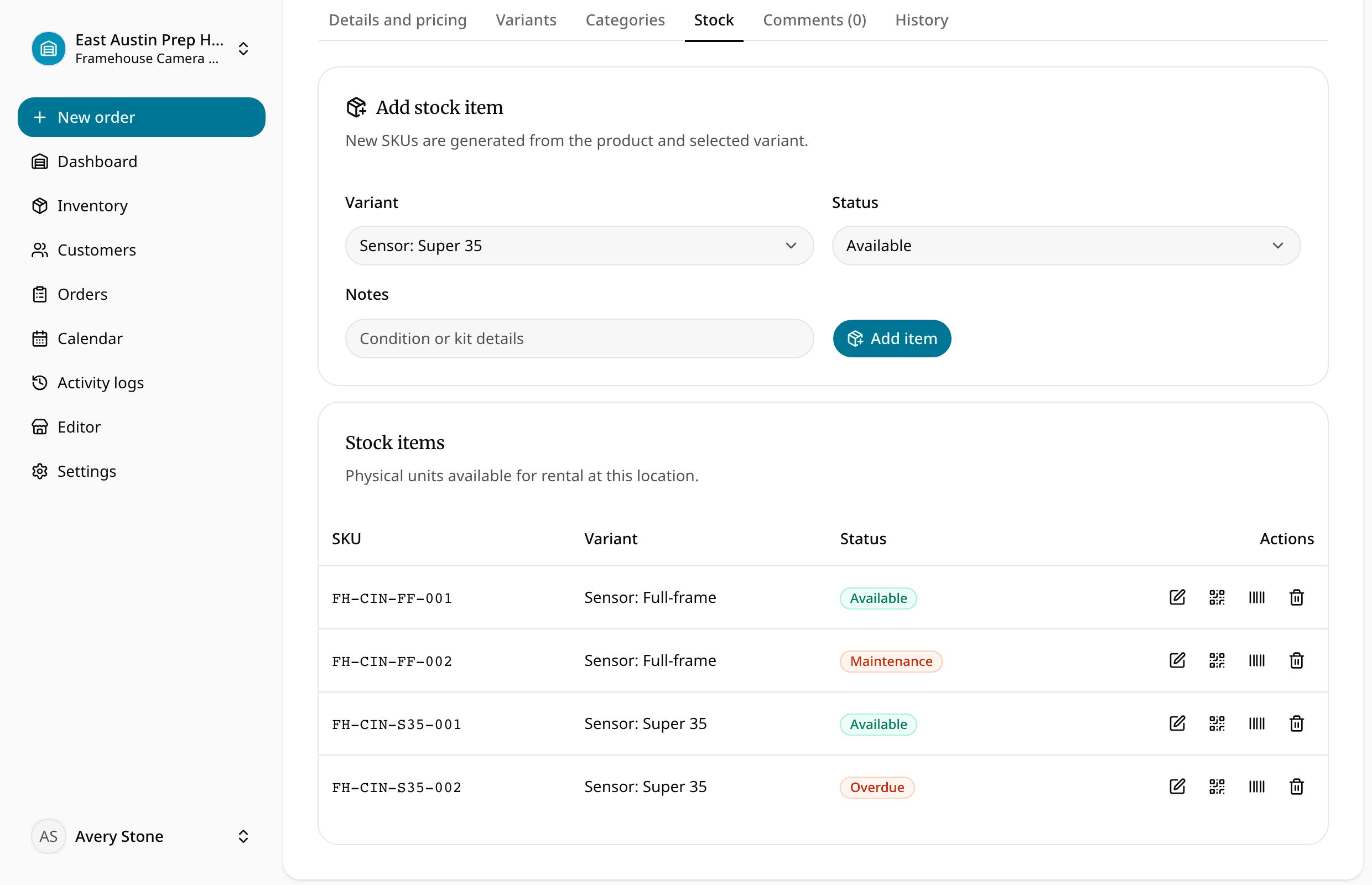
Separate the product customers request from the unit staff hands out. A "14-foot utility trailer," "plate compactor," or "full-frame camera kit" is a product. Each physical unit behind that product needs its own stable identifier.
A practical structure looks like this:
- Product: the offer customers recognize
- Variant: the size, capacity, configuration, or other selectable difference
- Physical item: the exact unit that moves
- SKU or asset ID: the stable identifier for that unit
For example, UTILITY-14-003 can identify the third 14-foot utility trailer. The identifier should not change when the trailer moves locations, goes into maintenance, or is assigned to a different customer.
Global standards are optional for a small operator, but GS1's Global Individual Asset Identifier guidance applies the same principle to fixed assets such as trucks, trailers, and containers. Your internal record can connect that identifier to location, repair, and maintenance data. Do not casually reuse an old unit's SKU.
Keep the SKU readable on the equipment even if you add a barcode or QR code. The QR code equipment tracking guide explains why the code should point to the record instead of carrying changing details.
Step 2: Keep the Essential Fields in One Source of Truth
Decide which shared record staff will trust. It can begin as a spreadsheet, but operational status should be current in one place. Use these fields as a minimum template:
| Field | What it should answer | Example |
|---|---|---|
| Item ID or SKU | Which exact unit is this? | COMP-PLATE-004 |
| Product and variant | What can the customer request? | Plate compactor, 20-inch |
| Current status | Can staff promise it? | Available, reserved, out, overdue, maintenance |
| Current location | Where should staff find it? | North yard, service bay, customer site |
| Customer and order | Who is responsible for it? | Rivera Landscaping, order 1842 |
| Checked-out time | When did custody change? | July 11, 9:15 a.m. |
| Due-back time | When should it return? | July 13, 4:00 p.m. |
| Next commitment | What future work depends on it? | Reserved July 15 at 8:00 a.m. |
| Condition or hold | Why is it not ready? | Returned; belt inspection required |
| Last update | Who changed the record and when? | Maya, July 11 at 9:17 a.m. |
Define a short status set with operational meanings instead of relying on free text or unlabeled colors.
For the underlying product, variant, unit, and consumable model, use the equipment inventory management guide. For naming exact units consistently, the rental SKU tracking guide goes deeper on identifier design.
Step 3: Update the Record at Every Rental Handoff
Make the record update part of each handoff, not cleanup for the end of the day.
When a request becomes a reservation
Confirm the rental window, eligible quantity or unit, location, due-back timing, and turnaround time. A request should not reduce availability until staff approves a real commitment.
When equipment is checked out
Record the item, customer, order, checkout and due-back times, accessories, and condition. Change the status to checked out before the item leaves staff control.
When equipment is returned
Record the return time and inspect what came back. Returned describes custody; it should not automatically mean ready. Use an inspection or maintenance status when more work is required.
When equipment changes location or enters maintenance
Update location and status together. Otherwise, the old yard may promise a transferred item, or staff may reserve a unit whose maintenance note never changed its availability.
For United States construction workplaces, the Occupational Safety and Health Administration requires regular inspections by designated competent people and requires noncompliant equipment to be identified as unsafe, made inoperable, or removed. Review the current 29 CFR § 1926.20 construction safety provision and manufacturer instructions; this guide does not set a universal inspection schedule.
The rental checkout and return process provides a more detailed counter workflow for these custody changes.
Step 4: Review Exceptions Every Day
A useful tracking system directs attention to likely errors. Start each day with exceptions instead of scanning the full catalog.
Use this daily checklist:
- Which items are overdue right now?
- Which checkouts have no exact unit assigned?
- Which returns are waiting for inspection?
- Which reserved items are still at the wrong location?
- Which units have overlapping or tight back-to-back commitments?
- Which maintenance holds lack an owner or next action?
- Which status or location records have not been updated since the last handoff?
- Which orders are due out today but are missing equipment or accessories?
Assign one person to each exception. Success means staff can explain why every unavailable item is unavailable and what must happen before it can be promised again.
Step 5: Reconcile the Records With Physical Inventory
Digital records need a physical check. Choose the cadence based on item value, rental frequency, location changes, and the cost of a wrong answer. Check fast-moving or high-value units more often, using a repeatable process:
- Freeze or note active movements during the count.
- Scan or read each item's stable identifier.
- Confirm location, status, condition, and assigned order.
- Record missing, duplicate, damaged, or unlabeled units as exceptions.
- Correct the underlying record and investigate the handoff that failed.
Do not quietly edit the totals until they match. Find out whether the unit moved without a transfer, left without checkout, returned without inspection, or was created twice. The audit should improve the next rental cycle, not only clean up today's count.
Spreadsheet or Rental Inventory Software?
A spreadsheet can be enough when one person controls a small inventory, rentals are infrequent, locations are simple, and overlapping commitments are rare.
Consider connected rental inventory software when several workflows happen at once:
| A spreadsheet may still work when... | Connected software becomes useful when... |
|---|---|
| One person handles most handoffs | Several staff members reserve, check out, and return equipment |
| The inventory has few exact units | Products have variants, quantities, and serialized units |
| A simple calendar shows commitments | Returns, maintenance, and location change real availability |
| Customer and order details are easy to reconcile | Staff retypes the same details across sheets, calendars, and messages |
| Exceptions are visible from memory | Overdue, uninspected, or conflicting items need shared attention |
The question is whether the current system keeps identity, availability, custody, and condition synchronized while the team works.
Common Rental Equipment Tracking Failures
- Tracking only product quantities when exact units have different locations or conditions
- Reusing an old SKU for a replacement item and losing the earlier unit's history
- Treating a customer request as a confirmed reservation
- Using the calendar as the inventory record
- Marking returned equipment available before inspection
- Recording maintenance in notes without changing the item status
- Moving equipment between locations without a transfer record
- Adding QR labels before cleaning up duplicate or unstable identifiers
Most failures happen because a physical handoff does not update the shared record.
Frequently Asked Questions
What information should I track for each rental item?
Track a stable item ID, product and variant, current status, location, assigned customer and order, checkout time, due-back time, next reservation, condition or maintenance hold, and the last update. Add serial numbers, accessories, service details, or photos when they affect identity, responsibility, or readiness.
How do I track several identical pieces of rental equipment?
Keep one customer-facing product, then create a separate item record and SKU for every physical unit that can differ by condition, location, custody, maintenance, or reservation. If truly interchangeable stock is managed only by quantity, track the quantity committed for each rental window and reconcile adjustments consistently.
Are QR codes enough to track rental equipment?
No. A QR code identifies or opens a record; it does not keep that record accurate. Scanning becomes useful when it updates a defined action such as checkout, return, transfer, inspection, or maintenance. Keep a human-readable SKU beside the code for damaged labels, dead batteries, or unavailable scanners.
How does equipment tracking prevent double bookings?
Equipment tracking prevents double bookings when reservations use the same unit, status, location, and date-range records as checkout, returns, and maintenance. Staff can then see whether eligible inventory is already committed, overdue, uninspected, or unavailable before confirming another customer request.
Keep the Record as Current as the Equipment
Learning how to keep track of rental equipment comes down to one discipline: every physical change needs a matching record change. Use stable identities, update each handoff, review exceptions daily, and reconcile records with what is physically present.
If the workflow still depends on one person remembering every exception, compare the current process with the RentalBench pricing and 14-day trial. Test it with a normal rental, an overlapping request, and a return that needs maintenance before moving the rest of the inventory.
About Ciprian Redinciuc
Ciprian Redinciuc writes RentalBench product and rental operations guides based on the workflows implemented in RentalBench: inventory, availability, orders, storefront intake, deposits, checkout, and returns.