
Rental Availability Calendar: What Small Rental Teams Actually Need
Learn how a rental availability calendar works across inventory, requests, reservations, due-back dates, returns, and maintenance.
January 27, 2026 · 8 min read
Key takeaways
The practical answer
- A calendar is useful only when it reflects real inventory and order status.
- Requested, reserved, checked-out, overdue, returned, and maintenance work must remain distinguishable.
- Due-back timing and inspection protect future reservations.
A rental availability calendar works by connecting requested dates to real inventory, reservations, active rentals, due-back timing, item status, and return readiness. Its job is to help your team know what can be promised, for which dates, without guessing.
That sounds simple.
Then Friday morning arrives.
A customer wants to keep a trailer until Monday. Another customer is scheduled to pick up that same trailer Saturday. Two generators are out, one is due back today, and one is waiting on repair. A staff member approved a request yesterday but forgot to update the spreadsheet. Someone else marked a concrete saw returned, but the blade kit is still missing.
This is where a normal calendar starts to break.
Rental availability is not just a blank space on a date grid. It depends on inventory, SKUs, requests, reservations, checkout, due-back dates, returns, maintenance, locations, deposits, and customer records.
For a small rental team, the calendar should be an operating tool, not a decoration. It should help staff answer the practical question at the counter:
Can we safely rent this item to this customer for this window?
This guide explains how a rental availability calendar works, what it should track, where generic calendars fall short, and how to set up a workflow that keeps availability close to reality. If you are comparing the product capability, see RentalBench' rental availability calendar software.
What Is a Rental Availability Calendar?
A rental availability calendar is a calendar view built around rentable inventory.
It shows when items are available, requested, reserved, checked out, due back, returned, blocked, or unavailable for maintenance. It should connect directly to the inventory and order records behind each rental.
That connection is the important part.
A generic shared calendar can show an event called "Trailer booked." A useful rental availability calendar should show which trailer, who reserved it, when it is due back, whether it has been checked out, whether it needs a deposit, and whether another customer is waiting for it next.
For some teams, the calendar is mostly about date ranges. For others, it needs pickup and return times, delivery windows, customer addresses, and item-level status.
The right level of detail depends on the rental business. A ten-trailer operation may care deeply about exact units, due-back times, deposits, and condition notes. A party rental team may need quantity availability across chairs, tables, tents, and accessories. A camera kit rental team may need component checks and return inspection before a kit can be rented again.
The common pattern is the same: the calendar needs to understand inventory over time.
Why Normal Calendars Fail for Rentals
Normal calendars are built for meetings, appointments, and reminders.
Rentals are different because the item leaves your control and comes back later. That creates risk before, during, and after the booking.
A rental item can be:
- Requested but not approved
- Reserved but not checked out
- Checked out and due back today
- Late
- Returned but not inspected
- Physically present but missing an accessory
- Blocked for maintenance
- Available at one location but not another
- Assigned to a future reservation
A basic calendar usually treats all of that as a colored block.
That is not enough when staff need to make a promise quickly.
For example, suppose a utility trailer is due back Friday at 10 a.m. Another customer wants it Friday at noon. The calendar may show a clean two-hour gap.
But the real answer depends on the operation.
Does the first customer usually return on time? Does the trailer need inspection? Is a light out? Does it need cleaning? Is the second customer driving a long distance? Is there a backup trailer? Has the deposit been handled?
The rental availability calendar should not make those decisions for your team. It should put the relevant facts in one place so staff can decide without rebuilding the whole story from memory.
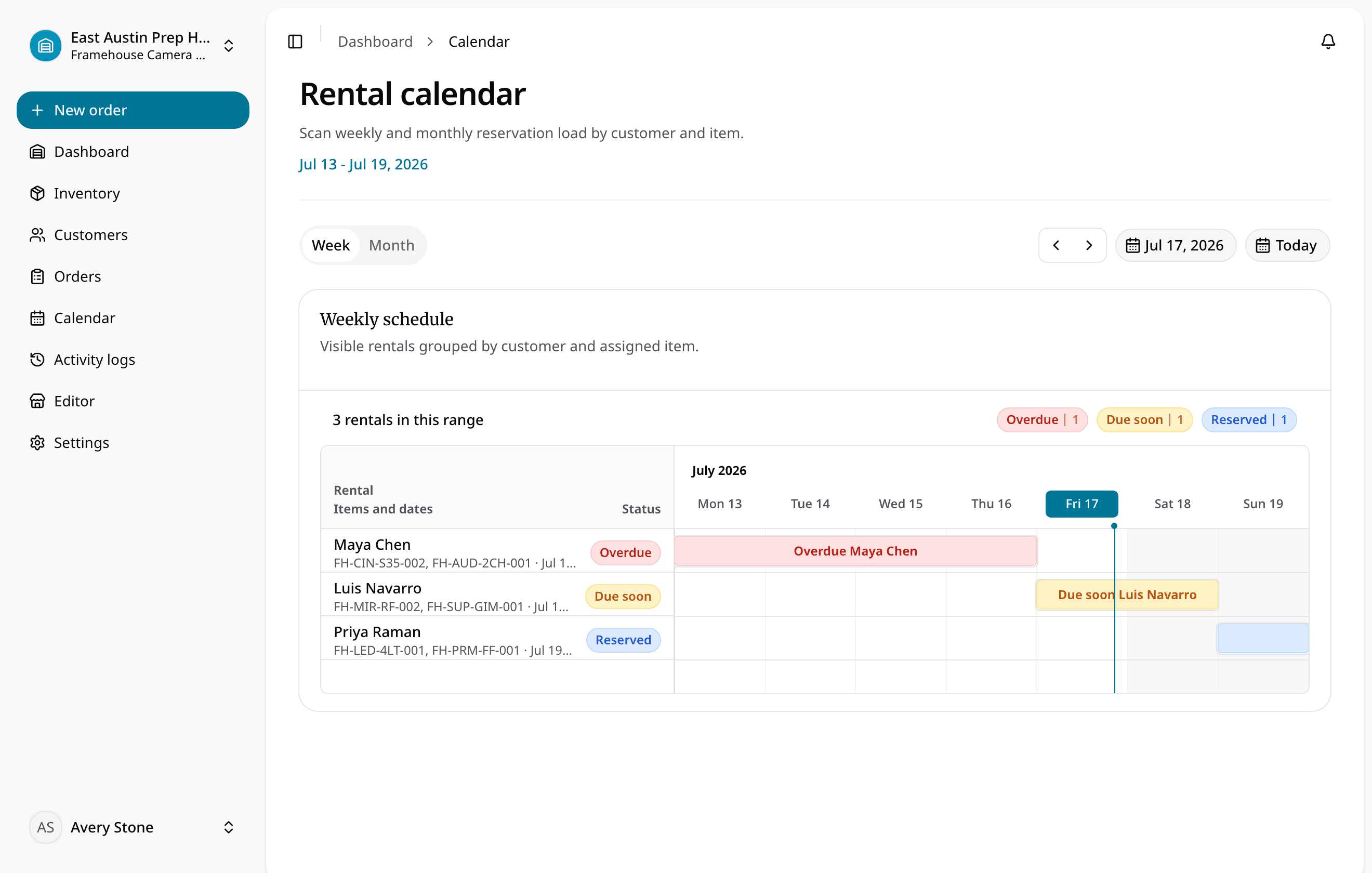
What the Calendar Should Show
A good rental availability calendar should show more than "booked" and "open."
At minimum, small rental teams should be able to see:
- Pending rental requests
- Approved reservations
- Active checkouts
- Due-back dates and times
- Late or unreturned items
- Maintenance holds
- Items that are returned but not ready
- Quantity available for SKU-style inventory
- Exact unit availability for serialized assets
- Customer and order context
That last point matters.
When someone clicks a calendar entry, they should not have to search a spreadsheet, inbox, or notebook to understand the rental. The calendar entry should connect to the order, customer, item, dates, notes, and status.
This is the reason purpose-built availability calendar software is different from a shared calendar. It is not only showing time. It is showing the operational state of rental inventory.
Separate Requests, Reservations, and Orders
One common scheduling mistake is treating every inquiry as a confirmed booking.
That creates confusion fast.
A request means a customer wants something. It may come from an online storefront, a phone call, a message, or staff entry at the counter.
A reservation means the team has reviewed the request and committed inventory for the rental window.
An order is the working rental record. It includes the customer, item, dates, pickup or delivery notes, deposit status, checkout, return, and internal notes.
Those stages should be visible but separate.
If requests instantly block inventory, the calendar can fill with unqualified demand. If requests do not appear anywhere useful, staff can miss work. If reservations are tracked only as calendar events, the team loses the operational details needed for checkout and return.
A cleaner flow looks like this:
- Customer submits a request.
- Staff checks availability and details.
- Staff approves, edits, or declines the request.
- Approved request becomes a reservation or order.
- Inventory is held for the committed dates.
- The order moves through checkout, return, and final item status.
RentalBench handles this through orders and reservations, where the rental promise stays tied to the item and customer record.
Track Items the Way You Actually Rent Them
Availability depends on how your inventory is structured.
Some rental businesses schedule by quantity. If you rent folding chairs, you may only need to know that 80 of 120 chairs are available next Saturday.
Other businesses schedule exact physical items. If you rent trailers, compact equipment, generators, camera kits, or specialty tools, the team often needs to know which unit is going out.
That difference matters.
The calendar should support both product-level availability and item-level availability where needed.
Product-level availability answers:
- Do we rent this type of item?
- How many are available for this date range?
- Is this category open for customer requests?
Item-level availability answers:
- Which exact unit is available?
- Is it checked out, reserved, late, or in maintenance?
- Is it at the right location?
- Does it have condition notes?
- Is it ready for the next customer?
If your current setup flattens all of that into one spreadsheet row, availability will become harder to trust as the business grows. A better rental inventory software workflow keeps catalog items, SKUs, physical units, and item statuses connected to the calendar.

Make Returns Part of Availability
The return is where many rental calendars drift away from reality.
An item may be physically back, but that does not mean it is ready to rent.
At return, staff may need to check:
- Actual return date and time
- Missing accessories
- Damage
- Cleaning needs
- Fuel or battery status
- Customer notes
- Deposit follow-up
- Maintenance status
- Whether the item can become available again
If the team marks the item available too early, the next customer may get a bad handoff. If the team forgets to mark it returned, staff may turn away a rental that could have been accepted.
The calendar should update from the return workflow, not from separate manual cleanup.
This is why checkout and returns matter for availability. Checkout confirms what left. Return confirms what came back. The future calendar depends on both.
Use Buffers Where the Operation Needs Them
Some rental teams can turn items around quickly.
Others need time between return and the next checkout.
Neither approach is automatically right. The right buffer depends on the item and the risk.
A trailer may need inspection and cleaning. A generator may need fuel and a test start. A camera kit may need batteries charged and accessories counted. A party rental order may need sorting before quantities are reliable again.
The calendar should make tight turnarounds visible.
For example, a same-day return and re-rental may be fine for a simple item with a backup unit. It may be risky for a high-demand item with no substitute.
Small teams do not need complicated rules for every edge case. But they should be able to see due-back times, upcoming reservations, and blocked status clearly enough to avoid wishful scheduling.
Keep Online Intake Under Staff Control
Customers want to browse and request rentals online.
That does not mean every rental should be instantly confirmed by a website.
For many small operators, a request-first storefront is safer. Customers can choose items, dates, and notes. Staff can review the request, check availability, confirm customer details, and decide whether to approve it.
This matters when inventory is limited, valuable, location-specific, or condition-sensitive.
An online rental storefront should reduce back-and-forth without letting the website make promises the team has not reviewed.
That is a practical distinction.
The customer gets a clear way to start the rental. The team keeps control over the calendar.
Questions to Ask Before Choosing a Calendar
Before choosing a rental availability calendar, ask operational questions instead of only comparing screenshots.
Can it show availability by date range?
Can it distinguish pending requests from confirmed reservations?
Can it handle exact items and SKU quantities?
Can staff see due-back dates and late items?
Can returned items stay unavailable until inspection?
Can maintenance block an item from being promised?
Can the calendar connect to orders, customers, deposits, checkout, and returns?
Can the team use it during a busy pickup window without slowing down?
If the answer is no, the calendar may look clean but still leave staff doing the real work outside the system.
For equipment-heavy teams, the same questions also apply when comparing equipment rental scheduling software. Scheduling only works when it is tied to inventory status and rental workflow.
A Simple Workflow to Aim For
The best rental availability calendar is the one your team can keep accurate every day.
A practical workflow can be simple:
- Keep inventory and SKUs clean.
- Capture rental requests with dates, items, and customer details.
- Review requests before promising inventory.
- Convert approved requests into reservations or orders.
- Check out the exact items that leave.
- Record due-back dates clearly.
- Complete returns before making items available again.
- Block maintenance items immediately.
- Review the calendar at the start and end of each day.
This routine prevents the calendar from becoming a second version of the truth.
For a small rental team, that is the goal. Not more dashboards. Not more admin work. Just a calendar that reflects what the business can actually rent.
The Bottom Line
A rental availability calendar should help small teams make better rental promises.
It should show what is requested, what is reserved, what is out, what is due back, what is late, what is blocked, and what is ready.
It should connect to inventory, customer records, orders, checkout, returns, and maintenance status.
Most importantly, it should match how rental work really happens. Customers ask for items by date. Staff approve or adjust the request. Inventory is held. Items leave. Items come back. Availability changes.
When the calendar follows that cycle, the team spends less time reconciling spreadsheets and more time running the rental counter with confidence.
About Ciprian Redinciuc
Ciprian Redinciuc writes RentalBench product and rental operations guides based on the workflows implemented in RentalBench: inventory, availability, orders, storefront intake, deposits, checkout, and returns.