
Rental SKU Tracking: Product Catalogs, Physical Items, and Why Both Matter
Learn how rental SKU tracking connects product catalogs, physical items, reservations, returns, and maintenance for small rental teams.
January 19, 2026 · 8 min read
Key takeaways
The practical answer
- The product is what customers request; the physical item is what staff hand over.
- Use stable SKUs plus QR or barcode payloads for exact units.
- Identifiers become useful when reservations, checkout, returns, maintenance, and history use them consistently.
Rental SKU tracking sounds like a catalog problem.
For a rental business, it is really an operations problem.
The SKU is how your team names, finds, reserves, checks out, returns, and maintains the things you rent. If the SKU structure is weak, the rest of the workflow starts to wobble. Staff use different item names, damaged units still look rentable, and nobody is sure which physical item a customer has.
That is why rental SKU tracking needs to separate two ideas:
- The product or catalog item customers ask for
- The physical item, unit, kit, or asset that actually leaves the shop
Both matter.
The catalog helps customers and staff understand what you offer. The physical item record helps the team know what is available, where it is, who has it, when it is due back, and whether it is ready for the next rental.
This guide explains rental SKU tracking for teams moving beyond spreadsheets, paper calendars, and generic booking tools.
What Rental SKU Tracking Means
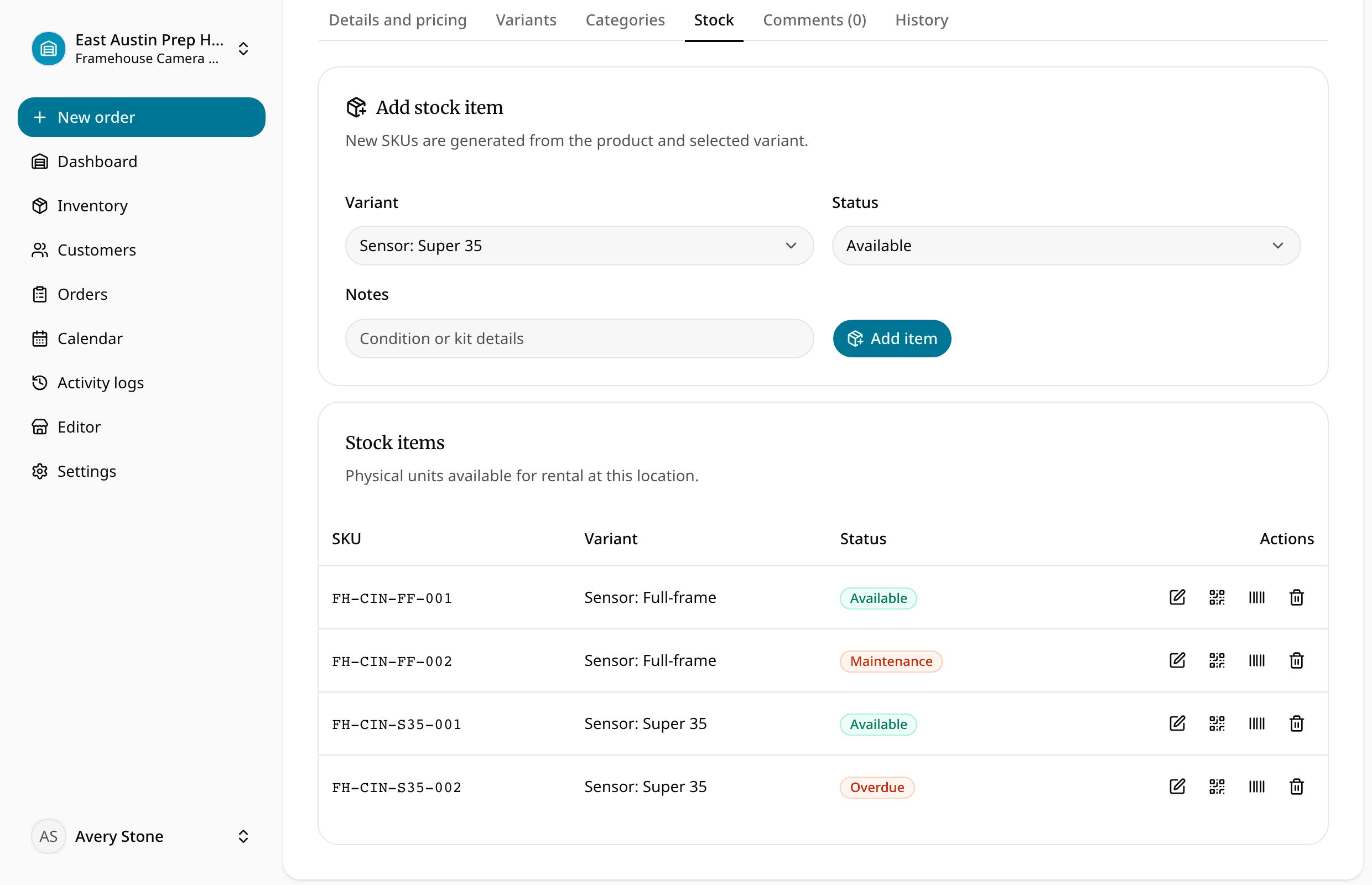
Rental SKU tracking is the process of assigning structured identifiers to rental inventory so the business can manage products, physical units, reservations, checkout, returns, and maintenance without guessing.
In a sales business, SKU tracking often means counting stock.
In a rental business, the same item comes back.
That changes the job. A rental SKU has to support a cycle: request, reserve, check out, use, return, inspect, repair if needed, and rent again.
The system should help answer plain operational questions: what the customer wants, which physical item can satisfy the request, whether it is available for the dates, who has it now, and what condition was recorded at checkout or return.
That is why rental SKU tracking belongs inside rental inventory software, not in a disconnected spreadsheet column that only one person understands.
Product Catalogs and Physical Items Are Different
Most rental teams need two levels of inventory.
The first level is the product catalog.
This is how the business describes what it rents: utility trailers, pressure washers, floor sanders, camera kits, generators, tent packages, compact loader attachments, drain snakes, speaker systems, or jobsite light towers.
The catalog is useful because customers and staff do not usually start with a serial number. They start with a need.
A customer says, "I need a trailer this weekend." A staff member searches for utility trailers. A website visitor browses the catalog. A counter worker checks the category, rate, deposit, and pickup notes.
The second level is the physical item.
This is the exact trailer, tool, case, machine, or kit that goes out the door. It may have its own SKU, serial number, barcode, plate number, condition, location, maintenance record, and order history.
For example:
- Catalog product: 14 ft utility trailer
- Physical item: Trailer T-014, plate number recorded, assigned to the north yard
This distinction is one of the first things a spreadsheet tends to blur.
A flat list may show that you own three trailers. It may not show which one is out, which one has a wiring issue, and which one is due back before tomorrow's pickup.
RentalBench treats inventory management as more than a product list because rental operators need the catalog and the physical item layer to stay connected.
Why Product-Only Tracking Breaks Down
Product-only tracking can work when inventory is small, interchangeable, and low risk. It starts to fail when real rental work gets specific.
Suppose you own four pressure washers. In the catalog, they may look identical. In the yard, one has a newer hose, one has a weak wand, one is already checked out, and one is reserved for Saturday morning.
If your system only says "pressure washer quantity: 4," it is not giving the team enough information.
The same problem shows up with trailers, compact equipment, high-value tools, camera kits, event packages, and shared jobsite assets.
Product-only tracking creates common gaps:
- A damaged unit still appears available because the product quantity was not reduced.
- A returned item is rented again before inspection.
- Staff cannot tell which customer has which unit.
- A kit comes back missing an accessory, but the order only says the broad product name.
None of these are unusual mistakes. They are normal outcomes when the system does not understand physical rental items.
That is where item tracking matters. Each physical unit needs its own status and history when the operation depends on knowing exactly what moved.

What a Useful Rental SKU Record Should Include
Your SKU structure should be simple enough that staff use it during real counter work.
It does not need to become an enterprise asset model. It does need to capture the details that prevent rental confusion.
At the product level, track:
- Product name
- Category
- Description
- Rental rate
- Deposit requirement
- Included accessories or kit contents
- Customer-facing or internal notes
At the physical item level, track:
- Unit SKU or item ID
- Serial number, barcode, plate number, or asset tag
- Current status
- Assigned location
- Condition notes
- Maintenance notes
- Current order or customer
- Due-back date
For some rentals, a lightweight item ID is enough. For others, you need stronger structure.
A folding chair may only need quantity tracking. A dump trailer usually needs unit tracking. A camera kit may need both a kit SKU and accessory checks. A generator may need meter readings or service notes.
The right level of detail depends on the risk, value, and operating reality of the item.
The rule is simple: if your staff need to ask "which one?" during checkout, return, maintenance, or a customer dispute, that item probably deserves its own physical record.
Connect SKUs to Availability
Rental SKU tracking is only useful if it affects availability.
A SKU that lives in a catalog but does not connect to reservations is just a label.
When a customer asks for a date range, your team needs to know whether the product is available and which unit can satisfy the request. That answer depends on reservations, current checkouts, expected returns, maintenance holds, and location.
For example, a customer wants a trailer from Friday afternoon through Monday morning.
Your catalog may show three trailers. But one is due back Friday evening, one is out until Tuesday, and one is in maintenance. If pickup is Friday at noon, the product may not actually be available.
A useful availability calendar should make that visible before the promise is made.
This is the key difference between a normal product catalog and a rental inventory workflow.
The product catalog says what you offer. Availability says whether you can safely promise it for specific dates. Physical item tracking says which exact unit carries that promise.
When those pieces are disconnected, staff have to rebuild the answer manually.
Tie SKUs to Requests, Reservations, and Orders
Rental work often starts before an order is confirmed.
A customer submits a request. A staff member checks dates. The team may adjust the item, confirm pickup timing, require a deposit, or ask about the jobsite.
SKU tracking should support that handoff.
At the request stage, the customer may only choose a product. At the reservation stage, the team may reserve a quantity or assign a specific unit. At checkout, the staff should confirm the exact physical item that leaves.
That workflow keeps the business flexible without losing control.
For example, a customer requests a 14 ft utility trailer. Your team confirms the date range and reserves the product. On pickup day, staff assign Trailer T-014 because it is clean, inspected, and sitting at the correct location.
RentalBench keeps this kind of detail close to orders and reservations, because the reservation is the rental promise. If the SKU assignment floats outside the order, the promise becomes harder to trust.
Use Checkout and Returns to Protect the SKU Record
Checkout is where the catalog becomes physical.
Staff should confirm what is leaving, who is taking it, when it is due back, what deposit applies, and what condition or accessories were present.
Return is where the SKU record gets corrected.
The item may come back clean and ready. It may come back late. It may need inspection. It may be missing a charger, hose, pin, case, key, blade, or adapter.
If checkout and return do not update the item record, SKU tracking becomes stale.
This is why checkout and returns should not be treated as separate paperwork. They are the moments when the team learns whether the physical item is still ready to rent.
A practical return workflow should let staff confirm the exact item came back, record missing accessories, add damage or cleaning notes, mark the item ready or held, and check the next reservation before releasing it.
The goal is not to slow down the counter. The goal is to stop small return details from becoming tomorrow's availability problem.
Maintenance Status Should Block the Right Item
Maintenance is where the product and physical item distinction becomes especially important.
If one trailer has a bad jack, you do not want to block every trailer in the catalog. You want to block that specific trailer. If a generator needs service, it should not appear ready just because it is physically back in the shop.
This is where item status has to be operational, not just descriptive.
Statuses such as available, reserved, checked out, returned, needs inspection, damaged, in maintenance, and retired should affect what staff can promise.
For small rental teams, this does not need to be complicated. A few clear statuses are usually better than a long list nobody uses.
The important point is that item statuses and maintenance need to be tied to availability. A maintenance note that does not change availability is easy to miss during a busy pickup window.
When Quantity Tracking Is Enough
Not every rental item needs a serialized physical record. If you rent large quantities of low-value, interchangeable items, quantity tracking may be enough. Folding chairs, basic linens, simple stakes, traffic cones, or duplicate accessories may not need individual item IDs.
But even then, the product catalog should be clear. You still need to know the quantity owned, reserved, out, returned, and unavailable.
The decision is how much tracking each category deserves, not "SKU tracking or no SKU tracking."
Use product-level quantity tracking when the exact unit does not matter. Use physical item tracking when condition, maintenance, customer responsibility, location, or availability depends on the exact unit.
That approach keeps the system practical.
A Simple SKU Setup for a Small Rental Team
If you are cleaning up rental SKU tracking from a spreadsheet, start with the items that create the most confusion. Do not try to perfect every category on day one.
Start with a short audit:
- Which items come back damaged or missing parts?
- Which items require deposits?
- Which items have serial numbers, plates, or asset tags?
- Which kits need accessory checks?
- Which items regularly need maintenance holds?
Then build a basic structure.
Use clear product names. Assign categories staff already understand. Give physical items short IDs that can be spoken over the counter. Avoid clever codes that only the owner can decode.
For example:
- TRAILER-14FT as the product
- T-014, T-018, and T-022 as physical units
The best SKU structure is not the most technical one. It is the one your team can use accurately while answering calls, preparing pickups, checking returns, and updating maintenance.
What to Look For in Rental SKU Tracking Software
When comparing software, test it against a real rental.
Pick one item with history. A trailer, generator, camera kit, compact tool, or event package works well. Then walk it through the full workflow.
Can you create the catalog product, attach physical units, reserve the product for a date range, assign the exact unit before checkout, see who has it, mark it returned but not ready, and keep maintenance status from being promised too soon?
Can staff see the same record without checking a spreadsheet, a paper calendar, and a text thread?
If the answer is no, the SKU feature may be too shallow for rental operations.
Good rental SKU tracking should help the business keep a clean promise: this is the item, this is the customer, this is the date range, this is the status, and this is whether it can go out again.
About Ciprian Redinciuc
Ciprian Redinciuc writes RentalBench product and rental operations guides based on the workflows implemented in RentalBench: inventory, availability, orders, storefront intake, deposits, checkout, and returns.