
Equipment Management Software for Small Rental Businesses: What to Look For
Compare equipment management software for small rental teams. Evaluate availability, checkout, returns, and imports, then test RentalBench with a sample rental.
October 20, 2026 · 9 min read
Key takeaways
The practical answer
- Evaluate equipment management software with a complete rental, including overlapping dates and a damaged return.
- Look for exact-unit records connected to availability, customers, orders, checkout, and return inspection.
- Use RentalBench's trial to test the documented rental workflow; evaluate GPS tracking or full maintenance scheduling separately if you need them.
Equipment management software helps a business organize equipment records, availability, assignments, and condition. For a small rental business, it should also connect those records to customer orders and rental dates. Before choosing a system, test whether staff can identify an available unit, reserve it, check it out, and record its return without reconciling separate files.
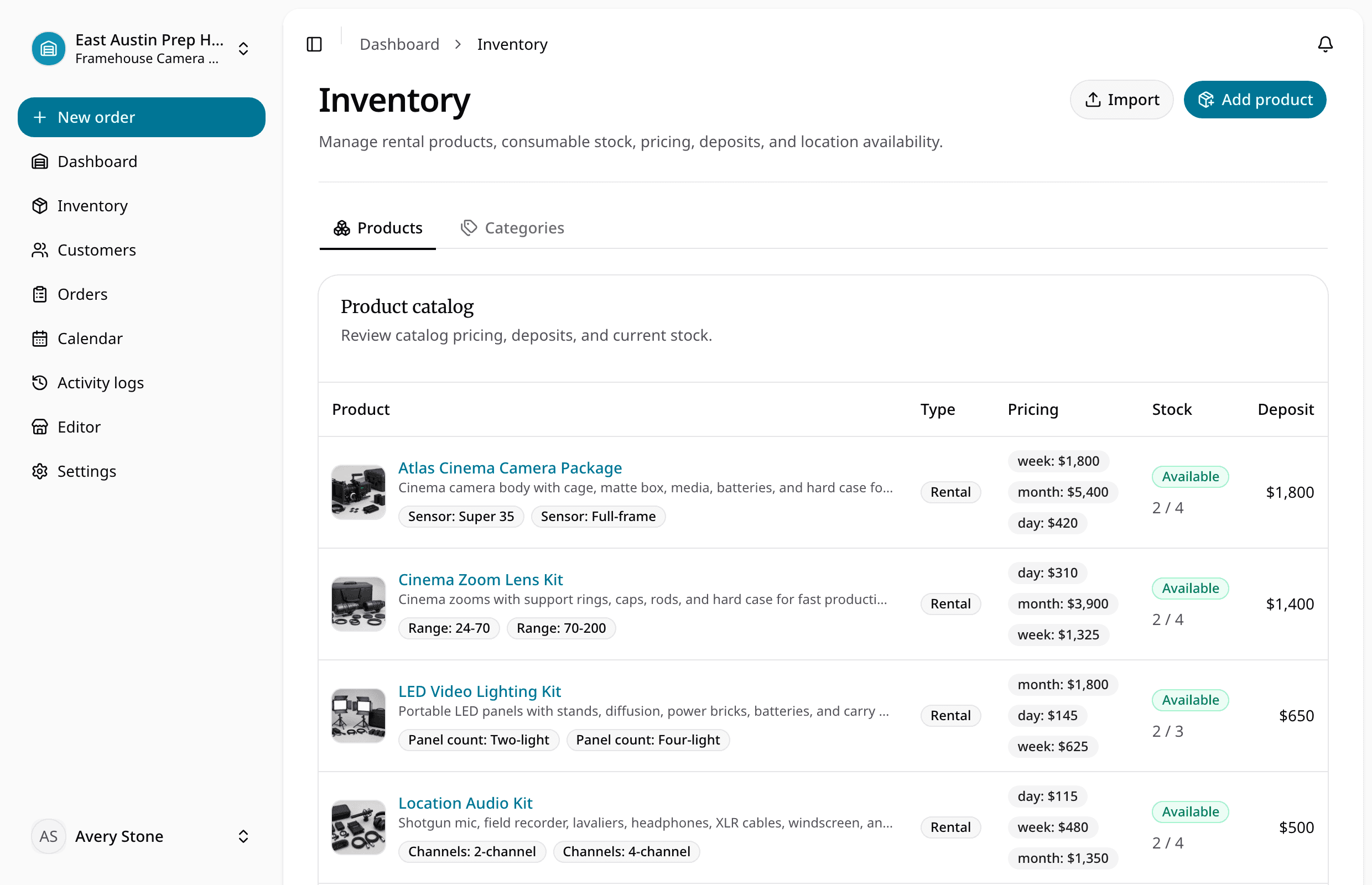
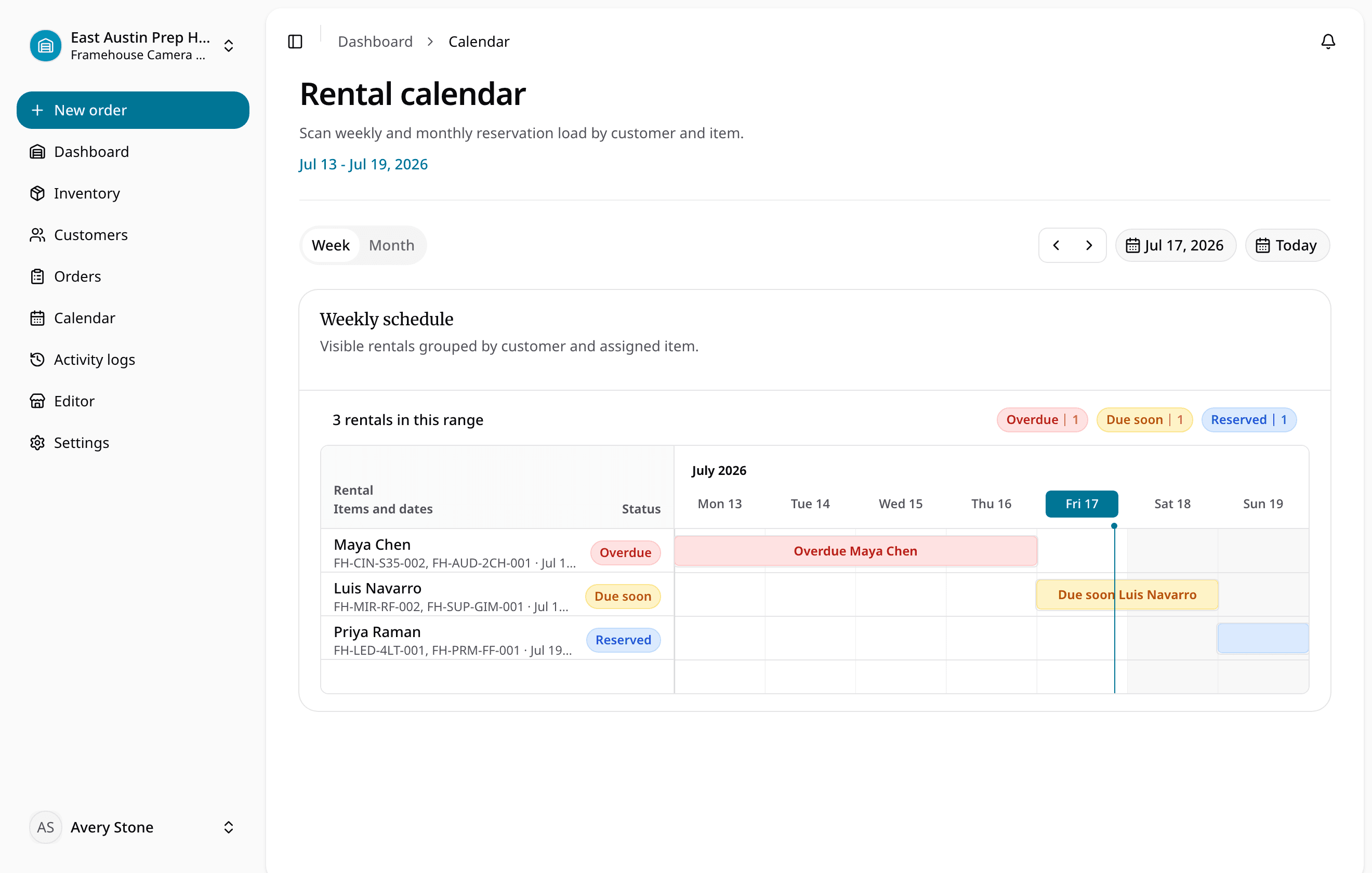
This guide is for tool shops, equipment yards, trailer operators, and camera rental teams evaluating that workflow. It is published by RentalBench and explains where our product fits. The compactor example is illustrative, based on documented behavior; the product captures show a separate camera-rental demo workspace.
In this guide
- The questions your software should answer
- Choose the right type of system
- Seven capabilities to evaluate
- Follow a sample rental in RentalBench
- Run a practical trial
- Frequently asked questions
What should equipment management software help you answer?
Start with the questions staff face when a customer calls:
| Question | What a useful answer includes |
|---|---|
| What can we rent for these dates? | Eligible inventory, existing commitments, and the requested rental window |
| Which exact unit will leave? | A stable item ID, product, variant, and current status |
| Who has it now? | The customer and order connected to the checkout |
| When is it due back? | The order's end time and any overdue status |
| Can we promise it again? | Its availability and return condition, including maintenance or loss |
A product count alone cannot answer all five. Two matching compactors may have different commitments or conditions. Likewise, a trailer's recorded yard location does not tell you whether it is reserved for tomorrow. Evaluate how the system connects identity, dates, and readiness before comparing optional features.
Choose the right type of system
“Equipment management” covers several jobs. Write down which one is causing your team the most rework, then use it to shortlist systems.
| System type | Main job | Question to ask during evaluation |
|---|---|---|
| Inventory register | Record equipment, identifiers, quantities, and locations | Can staff distinguish identical physical units? |
| GPS or telematics system | Locate or monitor connected equipment | What hardware, coverage, and reporting frequency does it require? |
| Maintenance management system | Organize service work, schedules, and maintenance records | Does it support the service program your equipment needs? |
| Rental operations software | Connect inventory to customer requests, reservations, checkout, and returns | Do those actions update the same operational records? |
For example, Samsara's equipment tracking page describes location tracking and connected diagnostics. That addresses a different requirement from recording which customer checked out a compactor. IBM's explanation of a computerized maintenance management system covers maintenance work orders and preventive maintenance scheduling.
RentalBench focuses on the rental operations row: inventory, availability, customers, orders, checkout, and returns. Its maintenance status keeps damaged units out of rentable inventory. Evaluate GPS hardware, engine diagnostics, scheduled servicing, and repair work orders separately if they are essential; this guide does not present RentalBench as a replacement for those systems.
Seven capabilities to evaluate before you buy
Use these checks during a demo or trial. Ask to see the resulting record after each action, rather than accepting a feature name as proof.
1. Exact-unit records
Create one product with two identical physical units. Can you give each its own SKU and distinguish its status and rental assignment? A camera model, tool type, or trailer size describes the offer; the item record identifies what actually leaves.
GS1's guidance on individual asset identifiers describes identifying individual assets so related information can follow the asset. A small shop can begin with clear internal IDs; buying a global identifier is not a prerequisite for this trial.
2. Date-based availability
Check the same product for two overlapping rental windows. The answer should reflect eligible units and existing commitments, not simply today's stock count. Repeat the check after a unit enters maintenance.
RentalBench's availability and inventory status documentation explains which orders block inventory and which unit statuses exclude it. Verify that behavior against the dates and quantities your team commonly rents.
3. Requests and reservations
Ask whether an incoming inquiry already consumes capacity. Staff should understand which action turns interest into a commitment. Otherwise, unanswered requests may appear to sell out the inventory, or accepted bookings may remain invisible to the next colleague.
In RentalBench, storefront checkout creates a requested order. Requested orders do not block inventory; reserved, approved, and checked-out orders do. Review the customer, rental window, inventory, and payment requirements before committing a request.
4. Customer and order links
Open an equipment assignment and find the associated customer and rental dates. Then open the customer record and find the relevant order. Check whether another staff member can recover the rental details without searching messages or copying a name between files.
For a fuller customer-record evaluation, use our guide to tracking rental customer history.
5. Checkout that records the handoff
Check out an allocated unit and inspect its resulting status. The record should identify what left and connect it to the order. Confirm due-back timing and any condition notes before completing the handoff.
RentalBench changes rental lines and their physical items to checked out. Its workflow keeps those units unavailable until return inspection. Verify required payment readiness as part of checkout, rather than treating a reservation as evidence that every pickup requirement is complete.
6. Return inspection and readiness
Return one unit normally and another as damaged. Can the system distinguish the outcomes? A damaged item should not become available simply because it is back in the yard.
RentalBench's return inspection workflow requires a disposition for each checked-out rental unit. Returned units become available, damaged units enter maintenance, and lost units move to lost. This gives the next reservation a more useful starting point than an undifferentiated “returned” note.
7. Spreadsheet import with a preview
Try a small sample before uploading the full inventory. Include product names, unit identifiers, rates, and quantities. Check the proposed field mappings and resulting records before committing; duplicate names or misplaced quantities can undermine a clean-looking import.
RentalBench provides upload, mapping, preview, and commit stages. Rental rows create individually tracked items; consumable rows represent quantity-based stock. Keep those models distinct when evaluating inventory import.
Try these checks with your own equipment in RentalBench.
How RentalBench handles a sample rental
Imagine a shop with two identical plate compactors: COMP-001 and COMP-002. Both start available. A customer requests one from Monday at 9 a.m. until Wednesday at 4 p.m. These times describe the example, not a recommended turnaround policy.
Review and reserve. Staff reviews the request and commits an eligible unit. While the order is only requested, it does not block inventory. Once COMP-001 is reserved for that window, the second compactor remains the candidate for a separate overlapping rental, provided it has no other blocking commitment.
Record checkout. At pickup, staff confirms the assigned unit, dates, payment requirements, and condition notes. Checking out COMP-001 changes its state to checked out. Its customer and rental period remain attached through the order, so a colleague can find the context of the handoff.
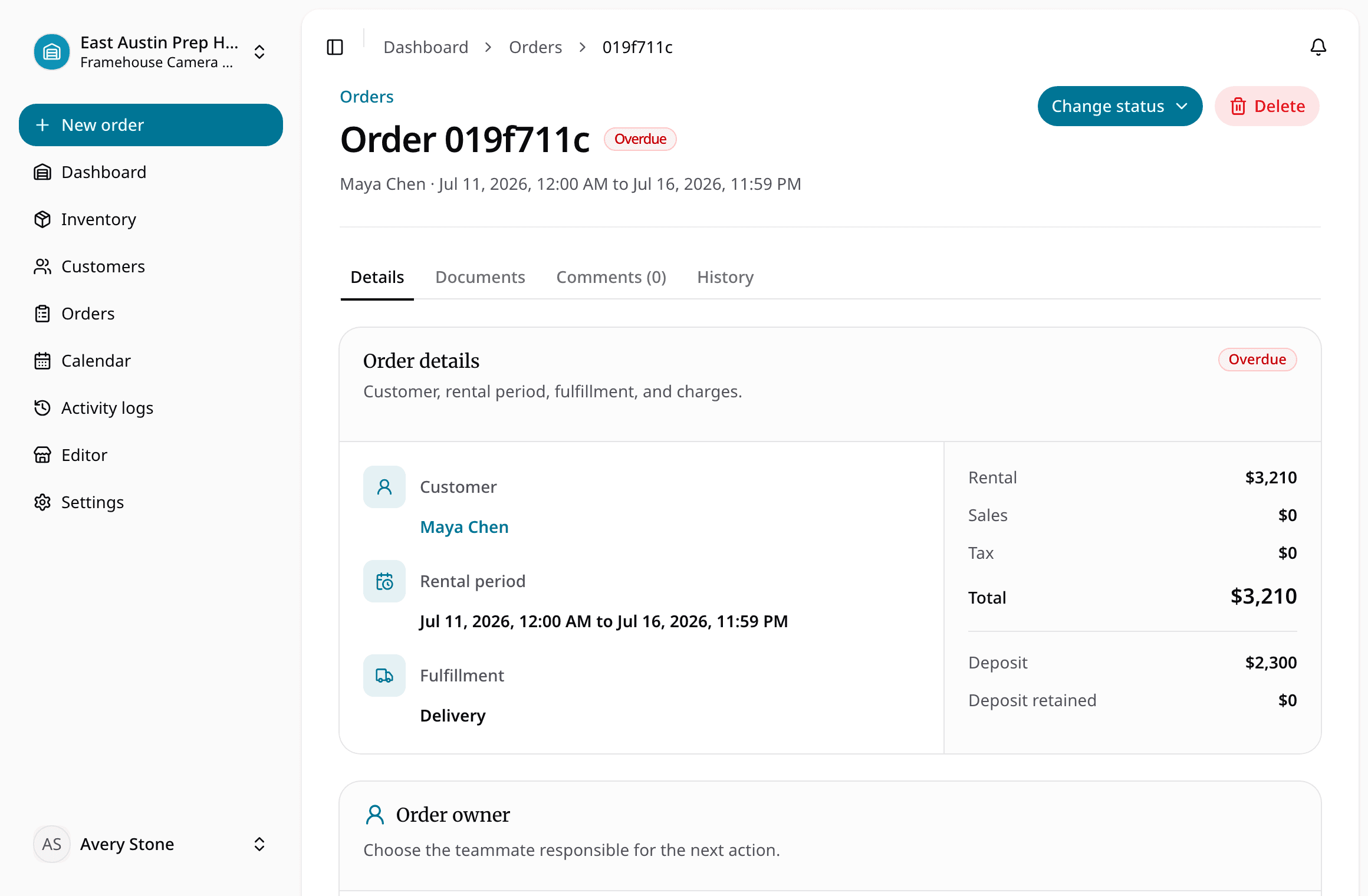
Inspect the return. The customer brings COMP-001 back with damage. Staff records the condition and selects damaged during return inspection. RentalBench moves the unit to maintenance, which excludes it from new rental demand. COMP-002 remains a separate record with its own availability.
| Stage | COMP-001 | COMP-002 |
|---|---|---|
| Before the request | Available | Available |
| Reservation committed | Reserved for the example window | Available unless separately committed |
| Pickup completed | Checked out | Its own status and commitments apply |
| Damaged return recorded | Maintenance; cannot satisfy new demand | Its own status and commitments apply |
Staff still owns the repair decision and readiness check. A maintenance status does not diagnose a fault or certify that equipment is safe. The operational benefit is that the damaged unit's status affects what the team can promise next.
Run a sample rental from reservation to return.
A practical equipment management software trial checklist
Test a representative rental before migrating active records. Use sample customers and equipment so you can explore exceptions without changing a live booking.
- Add three physical items. Create two matching compactors and one different rental product. Give each unit a distinct identifier.
- Make the first reservation. Reserve one compactor for a two-day window and identify the assigned unit.
- Test overlapping demand. Create a second reservation for the other compactor during that window. Then attempt a third overlapping allocation and confirm no eligible compactor remains.
- Find the customer and order. Ask a colleague to locate the first rental's customer, unit, and due-back time.
- Check out the first unit. Confirm its checkout state and order details. Check what availability shows for the same dates.
- Inspect its return as damaged. Confirm that it moves to maintenance and cannot satisfy a new request. Leave the second unit's existing reservation intact.
- Preview a small import. Check identifiers, product types, and quantities before committing any additional records.
Keep a simple result for each check: passed, unclear, or failed, with a note explaining what you saw. Investigate unclear results before moving the rest of your inventory. If one person maintains a small, infrequently rented collection reliably in a spreadsheet, that may still be enough. For daily tracking procedures, see how to keep track of rental equipment.
Equipment management software FAQ
Can a small rental business use a spreadsheet instead?
Yes. A spreadsheet can work when one person keeps item identities, dates, customers, and condition current. Test it against overlapping reservations and a damaged return. Consider connected software when several staff must update those records or reconcile separate files before confirming whether an item can be rented again.
Is equipment management the same as equipment tracking?
The terms overlap, so ask what the vendor means. Tracking may describe item assignments, recorded locations, or GPS hardware. Equipment management can also include availability, maintenance, and other workflows. For rentals, evaluate customer orders, date commitments, checkout, and return outcomes together; a location reading alone cannot confirm rental readiness.
Is RentalBench suitable for a small rental team?
RentalBench is designed for small rental operators who need inventory connected to availability, customers, orders, checkout, and returns. Test those tasks with your equipment before choosing it. If your essential requirement is live GPS location, engine diagnostics, or a full maintenance work-order system, evaluate those requirements separately.
Choose software by the rental it can complete
The right equipment management software should make the next rental decision easier. Use the same sample to compare how each system handles exact units, overlapping dates, customer context, checkout, and a damaged return. Choose based on the records and outcomes your staff can verify.
Review RentalBench pricing and trial terms, then use the trial checklist above. The 14-day Plus trial requires a card. Start monthly billing begins afterward unless you choose another plan or cancel through billing.
About Ciprian Redinciuc
Ciprian Redinciuc writes RentalBench product and rental operations guides based on the workflows implemented in RentalBench: inventory, availability, orders, storefront intake, deposits, checkout, and returns.