
Camera Rental Inventory Checklist: Bodies, Lenses, Kits, and Returns
Use this camera rental inventory checklist to structure products, variants, exact units, prep notes, reservations, checkout, and return inspection.
June 14, 2026 · 3 min read
Key takeaways
The practical answer
- Model the package customers request separately from the exact unit staff hands over.
- Use variants for meaningful choices such as mount, sensor, focal range, or kit size.
- Prep and return inspection must protect the next call time.
A camera rental catalog needs to work for two different people. The customer or producer wants to request a clear package. The prep team needs to know the exact bodies, lenses, media, batteries, support, and accessories that will leave.
If those two views collapse into one list, package availability becomes difficult to trust. Use this checklist to keep the catalog understandable while preserving item-level control.
Build customer-facing products
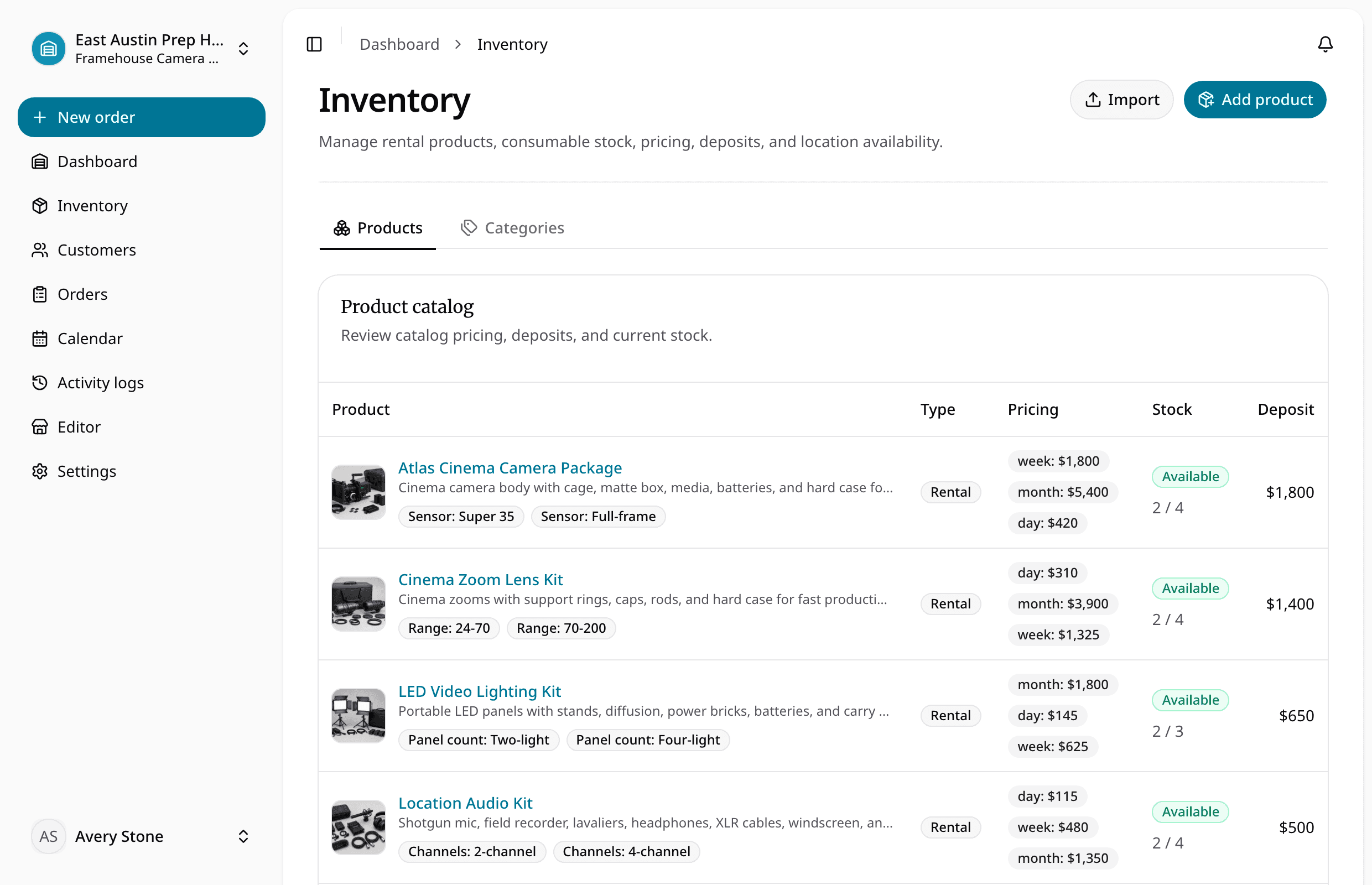
Create products around the packages customers actually request:
- Cinema camera package
- Mirrorless interview kit
- Prime lens set
- Zoom lens kit
- LED lighting package
- Location audio kit
- Tripod and gimbal support kit
- Wireless monitor kit
Give each product a useful description, images, pricing cadence, deposit, tax profile, and preparation notes. Avoid turning every cable into a customer-facing product unless it is rented independently.
Use variants for real choices
Variants should change selection or preparation. Examples include:
- Sensor: Super 35 or full-frame
- Mount: RF, E, PL, or EF
- Lens coverage or focal range
- Panel count
- Audio channel count
- Monitor size
Keep the label meaningful to the customer and prep team. If an attribute belongs only to one serialised unit, put it on the physical item instead.
Track exact rental units
Each body, lens set, light kit, recorder, support kit, or monitor that staff assigns should have an item record with:
- Stable SKU
- QR and barcode payload
- Product and variant
- Location
- Status
- Condition and prep notes
- Recorded history
This lets the order reserve a product while checkout assigns the exact unit. The distinction matters when two camera bodies share a catalog name but have different mounts, condition, location, or service history.
Keep kit contents explicit
Before checkout, confirm the items that make the package usable:
- Media and readers
- Batteries and chargers
- Power supplies
- Cages, handles, plates, and rods
- Caps, filters, and cases
- Cables and adapters
- Stands, clamps, and modifiers
Use notes or documents to record any order-specific substitution. The customer should know what was included, and the return team should have something concrete to inspect.
Protect date availability
Check the complete date range against:
- Requested and approved work
- Existing reservations
- Checked-out and overdue rentals
- Due-back timing
- Location
- Variant
- Item status
- Return and prep buffer
A camera that returns at 9:00 does not automatically support a 10:00 pickup. Inspection, charging, cleaning, media preparation, and accessory counts take time. Use the rental availability calendar guide to define the decision.
Record the prep and handoff
The order should contain the customer, production or jobsite address, dates, assigned items, price, tax, deposit, fulfillment, documents, signature, and prep notes.
At checkout:
- Verify exact units and kit contents.
- Record condition and substitutions.
- Confirm deposit and payment readiness.
- Issue the required document.
- Record pickup or delivery and due-back details.
Inspect before reopening the package
Returned is not the same as ready. Check:
- Body and lens condition
- Mounts, ports, screens, controls, and glass
- Media and battery count
- Chargers, adapters, cables, and cases
- Damage, loss, cleaning, or maintenance needs
- Deposit refund or retention context
Update the exact unit status immediately. The next reservation should see maintenance, damage, loss, or incomplete return before staff promises the package again.
For a full commercial workflow, see camera rental software for small teams. For item identity, use the rental SKU tracking guide.
About Ciprian Redinciuc
Ciprian Redinciuc writes RentalBench product and rental operations guides based on the workflows implemented in RentalBench: inventory, availability, orders, storefront intake, deposits, checkout, and returns.